Get certified for free when you join Fabric Data Days 2026 and dive into Fabric, Power BI, SQL, AI, and other essential data skills.
Join nowJuly 28 - August 9 | Final Round of the Power BI Dataviz World Championships. This is your chance. Learn more
Can someone help me with the following, I would like to see who the reports created have been shared with within our organization. Is there a method available for that?
Solved! Go to Solution.
Hi @RonvdLaan ,
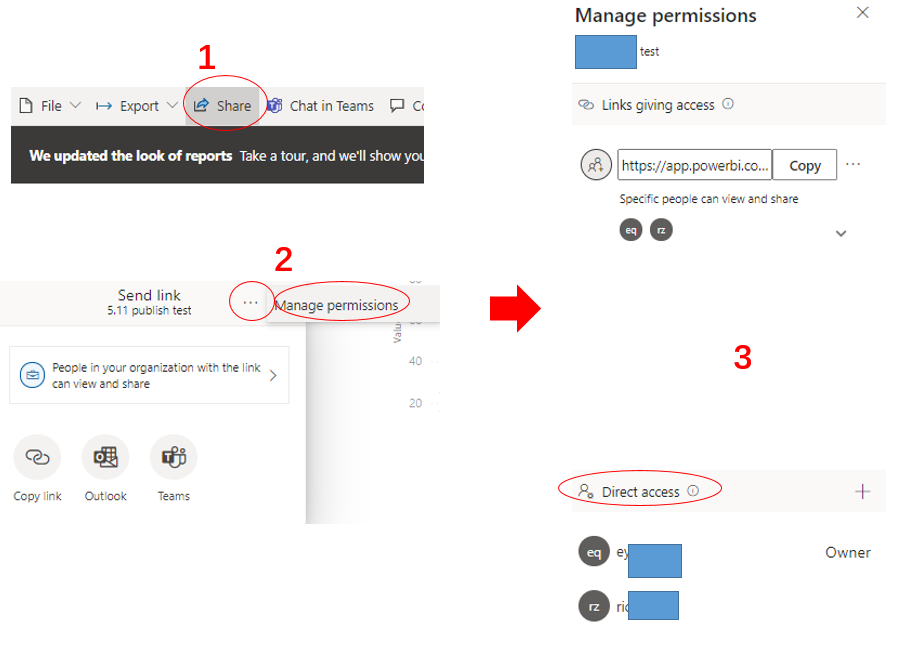
To manage permission and manage links that give access to the report, select More options (...) in the upper right of the sharing dialog, and then select Manage permissions:
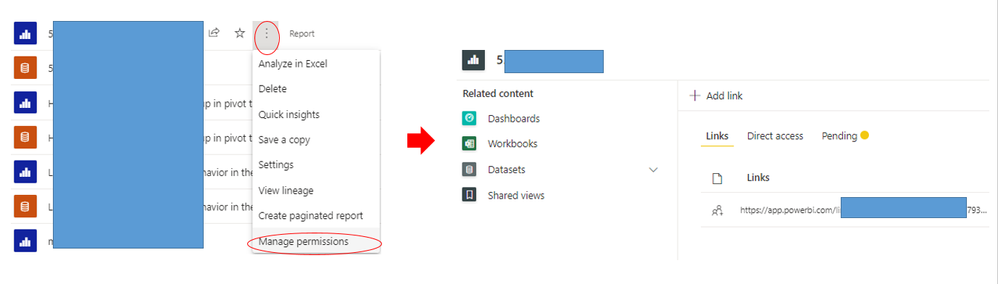
For additional access management capabilities, select the More options (...) of the report ,then select Manage permissions. This takes you to the management page, where you can:
Or you could use Usage Metrics feature which will report Unique viewers per day as well.
For more information, please refer to :
Share Power BI reports and dashboards with coworkers and others - Power BI | Microsoft Docs
Monitor usage metrics in classic workspaces - Power BI | Microsoft Docs
Monitor usage metrics in the new workspace experience (preview) - Power BI | Microsoft Docs
Best Regards,
Eyelyn Qin
If this post helps, then please consider Accept it as the solution to help the other members find it more quickly.
Hi @RonvdLaan ,
To manage permission and manage links that give access to the report, select More options (...) in the upper right of the sharing dialog, and then select Manage permissions:
For additional access management capabilities, select the More options (...) of the report ,then select Manage permissions. This takes you to the management page, where you can:
Or you could use Usage Metrics feature which will report Unique viewers per day as well.
For more information, please refer to :
Share Power BI reports and dashboards with coworkers and others - Power BI | Microsoft Docs
Monitor usage metrics in classic workspaces - Power BI | Microsoft Docs
Monitor usage metrics in the new workspace experience (preview) - Power BI | Microsoft Docs
Best Regards,
Eyelyn Qin
If this post helps, then please consider Accept it as the solution to help the other members find it more quickly.
Join us in Barcelona for FabCon and SQLCon, the Fabric, Power BI, SQL, and AI community event. Save €200 with code FABCMTY200.
If you love stickers, then you will definitely want to check out our community sticker challenge, Barcelona edition!
Check out the July 2026 Power BI update to learn about new features.
| User | Count |
|---|---|
| 17 | |
| 8 | |
| 6 | |
| 6 | |
| 5 |