cancel
Showing results for 
Search instead for 
Did you mean: 

Learn from the best! Meet the four finalists headed to the FINALS of the Power BI Dataviz World Championships! Register now

Reply
RonvdLaan
Frequent Visitor

Overview shared reports

Can someone help me with the following, I would like to see who the reports created have been shared with within our organization. Is there a method available for that?


1 ACCEPTED SOLUTION
Anonymous
Not applicable

Hi @RonvdLaan ,


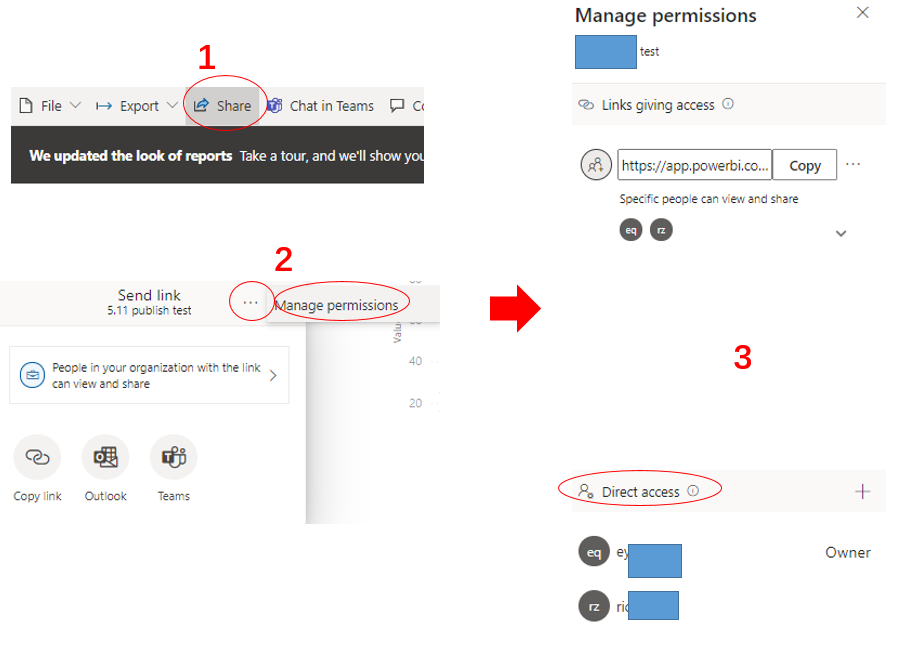
To manage permission and manage links that give access to the report, select More options (...) in the upper right of the sharing dialog, and then select Manage permissions:

Manage permissions to a report.PNG

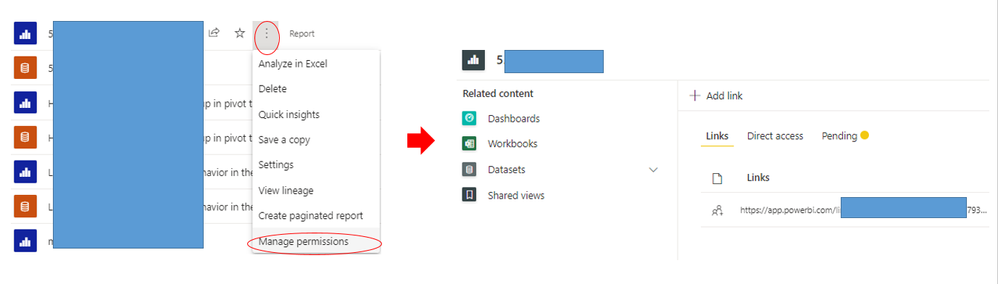
For additional access management capabilities, select the More options (...) of the report ,then select Manage permissions. This takes you to the management page, where you can:

  • View, manage, and create Links.
  • View and manage who has Direct access and grant people direct access.
  • View and manage Pending access requests and invitations.
  • View and manage Related content.
  • Apply Filters or Search for specific links or people.

additional access management.PNG


Or you could use Usage Metrics feature which will report Unique viewers per day as well. 


For more information, please refer to :

Share Power BI reports and dashboards with coworkers and others - Power BI | Microsoft Docs

Monitor usage metrics in classic workspaces - Power BI | Microsoft Docs

Monitor usage metrics in the new workspace experience (preview) - Power BI | Microsoft Docs


Best Regards,
Eyelyn Qin
If this post helps, then please consider Accept it as the solution to help the other members find it more quickly.

View solution in original post

1 REPLY 1
Anonymous
Not applicable

Hi @RonvdLaan ,


To manage permission and manage links that give access to the report, select More options (...) in the upper right of the sharing dialog, and then select Manage permissions:

Manage permissions to a report.PNG

For additional access management capabilities, select the More options (...) of the report ,then select Manage permissions. This takes you to the management page, where you can:

  • View, manage, and create Links.
  • View and manage who has Direct access and grant people direct access.
  • View and manage Pending access requests and invitations.
  • View and manage Related content.
  • Apply Filters or Search for specific links or people.

additional access management.PNG


Or you could use Usage Metrics feature which will report Unique viewers per day as well. 


For more information, please refer to :

Share Power BI reports and dashboards with coworkers and others - Power BI | Microsoft Docs

Monitor usage metrics in classic workspaces - Power BI | Microsoft Docs

Monitor usage metrics in the new workspace experience (preview) - Power BI | Microsoft Docs


Best Regards,
Eyelyn Qin
If this post helps, then please consider Accept it as the solution to help the other members find it more quickly.

Helpful resources

Announcements
Power BI DataViz World Championships carousel

Power BI DataViz World Championships - June 2026

A new Power BI DataViz World Championship is coming this June! Don't miss out on submitting your entry.

Join our Fabric User Panel

Join our Fabric User Panel

Share feedback directly with Fabric product managers, participate in targeted research studies and influence the Fabric roadmap.

March Power BI Update Carousel

Power BI Community Update - March 2026

Check out the March 2026 Power BI update to learn about new features.