Hi @RonvdLaan ,
To manage permission and manage links that give access to the report, select More options (...) in the upper right of the sharing dialog, and then select Manage permissions:
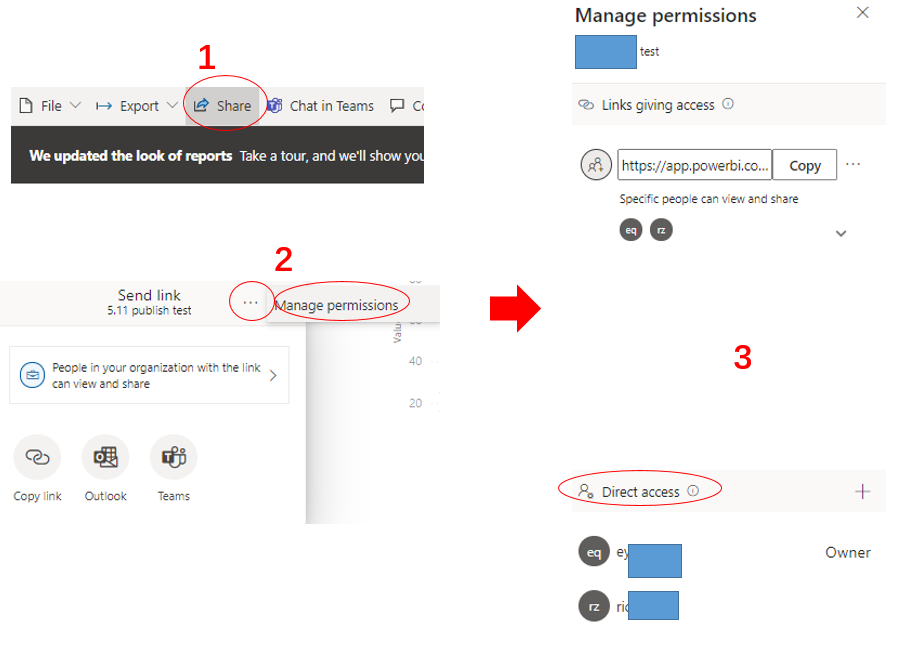
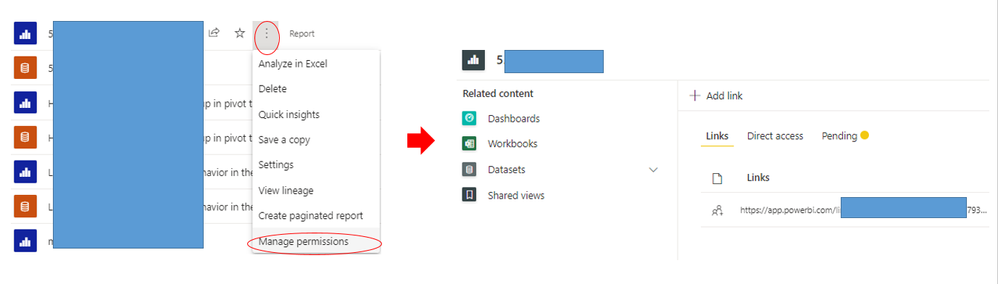
For additional access management capabilities, select the More options (...) of the report ,then select Manage permissions. This takes you to the management page, where you can:
- View, manage, and create Links.
- View and manage who has Direct access and grant people direct access.
- View and manage Pending access requests and invitations.
- View and manage Related content.
- Apply Filters or Search for specific links or people.
Or you could use Usage Metrics feature which will report Unique viewers per day as well.
For more information, please refer to :
Share Power BI reports and dashboards with coworkers and others - Power BI | Microsoft Docs
Monitor usage metrics in classic workspaces - Power BI | Microsoft Docs
Monitor usage metrics in the new workspace experience (preview) - Power BI | Microsoft Docs
Best Regards,
Eyelyn Qin
If this post helps, then please consider Accept it as the solution to help the other members find it more quickly.


