cancel
Showing results for 
Search instead for 
Did you mean: 

The Power BI Data Visualization World Championships is back! Get ahead of the game and start preparing now! Learn more

Reply
andershh
Advocate I
Advocate I

Difference in Line Chart visualization between Power BI Desktop and app.powerbi.com

Hi Power BI Community


I am having some issues with the Line Chart visual in Power BI. The trouble is that there is a difference between how the graph is displayed in Power BI Desktop and app.powerbi.com.


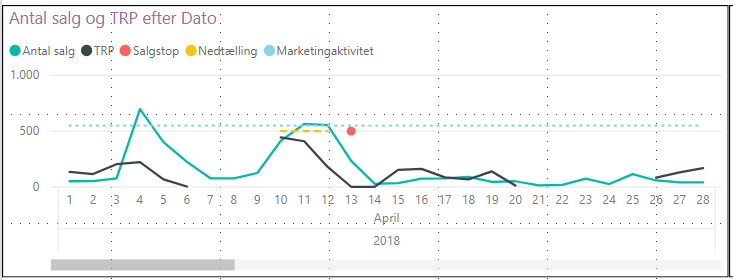
In Power BI Desktop my Line Chart the black line is disjointed when there are days with no data (this is what I want it to look like).


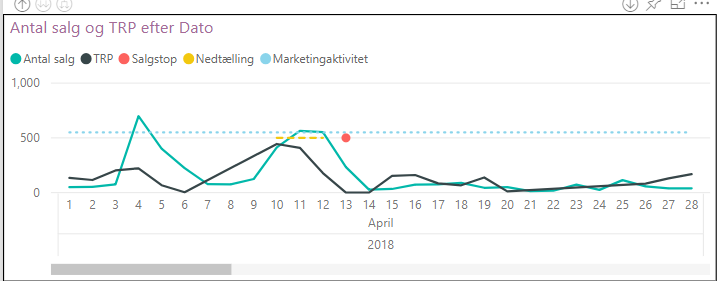
However, when uploading the report to app.powerbi.com the black line is no longer disjointed.


See below images:


Power BI DesktopPower BI Desktopdapp.powerbi.comapp.powerbi.com

Does any of you know why there is this difference between the two?


Many thanks beforehand!


2 REPLIES 2
v-juanli-msft
Community Support
Community Support

Hi @andershh

A similar problem has been reported, after testing and discussing, we could raise the following summary:

By Design, new charts with numeric axes will pick "continuous" which will generate linear spaced tick marks (e.g. 0, 5, 10, 15 ... 30). If an existing chart changed, perhaps the axis type was still undefined and a modeling change caused the "week number" field to change from "text" to "numeric". This is not a product bug, something must have changed in the model or report and the default behavior worked as expected.

Could you check you setting for your chart and make some changes, perhaps set the axis type to categorical and update the sort?


Best regards

Maggie

Greg_Deckler
Community Champion
Community Champion

Looks like some sort of bug one way or the other. I'd report it to Issues.


Follow on LinkedIn
@ me in replies or I'll lose your thread!!!
Instead of a Kudo, please vote for this idea
Become an expert!: Enterprise DNA
External Tools: MSHGQM
YouTube Channel!: Microsoft Hates Greg
Latest book!:
DAX For Humans

DAX is easy, CALCULATE makes DAX hard...

Helpful resources

Announcements
Power BI DataViz World Championships

Power BI Dataviz World Championships

The Power BI Data Visualization World Championships is back! Get ahead of the game and start preparing now!

December 2025 Power BI Update Carousel

Power BI Monthly Update - December 2025

Check out the December 2025 Power BI Holiday Recap!

FabCon Atlanta 2026 carousel

FabCon Atlanta 2026

Join us at FabCon Atlanta, March 16-20, for the ultimate Fabric, Power BI, AI and SQL community-led event. Save $200 with code FABCOMM.