cancel
Showing results for 
Search instead for 
Did you mean: 

July 7 - July 17 | Round 2 of the Power BI Dataviz World Championships. Don't miss your chance! Learn more

Reply
agragesh123
Frequent Visitor

Date Display Format- Power BI Service

Hi!


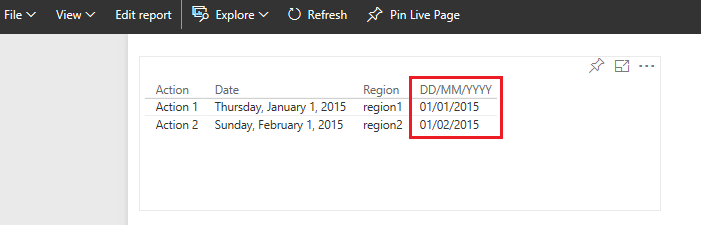
How to change the date display format from MM/DD/YYYY to DD/MM/YYYY in power BI Service. The Date is in DD/MM/YYYY when I uploaded it from my .pbix file but in service it takes it as MM/DD/YYYY. How to change this.


 this is in MM/DD/YYYY how to change this to DD/MM/YYYY in power bi servicethis is in MM/DD/YYYY how to change this to DD/MM/YYYY in power bi service

Please do help out


With Regards

Agragesh 

4 REPLIES 4
v-qiuyu-msft
Community Support
Community Support

Hi @agragesh123,


I'm not able to reproduce the issue on my side. The DAX = Format([Date],"dd/MM/yyyy" ) will work fine in Power BI service.


q6.PNG


In your scenario, please publish the attached .PBIX file to service to see if the issue persists.


Best Regards,
Qiuyun Yu

Community Support Team _ Qiuyun Yu
If this post helps, then please consider Accept it as the solution to help the other members find it more quickly.
tringuyenminh92
Memorable Member
Memorable Member

Please choose that field and navigate to Modeling tab, and choose options in Format


2016-12-02_17h28_53.png


In case this feature could not adapt your expectation, you could use DAX with Format function:

_ Create New Calculated Column

_ New Column = Format([DateField],"dd/MM/yyyy" )


Otherwise, You should refer discussed topic for locale setting:

https://community.powerbi.com/t5/Desktop/How-to-change-the-date-format/td-p/40460

hi! @tringuyenminh92


I have tried both the methods suggested before. I guess Modelling Tab is avilable only in Power BI desktop and not in Service. 

My desktop version is correctly displaying the date as DD/MM/YYYY but once I upload to service it changes to MM/DD/YYYY this is the problem.


Thanks 

Regards

Agragesh 

In this case, we could wait response from some staffs or you could post this in issue forum: http://community.powerbi.com/t5/Issues/idb-p/Issues 

Helpful resources

Announcements
FabCon and SQLCon Barcelona 2026

FabCon & SQLCon – Barcelona 2026

Join us in Barcelona for FabCon and SQLCon, the Fabric, Power BI, SQL, and AI community event. Save €200 with code FABCMTY200.

60 days of Data Days Carousel

Data Days 2026

Join Fabric Data Days 2026: 60 days of free live/on-demand sessions, challenges, study groups, and certification opportunities.

Power BI DataViz World Championships carousel

Power BI DataViz World Championships - June 2026

A new Power BI DataViz World Championship is coming this June! Don't miss out on submitting your entry.