Join us at FabCon Atlanta from March 16 - 20, 2026, for the ultimate Fabric, Power BI, AI and SQL community-led event. Save $200 with code FABCOMM.
Register now!The Power BI Data Visualization World Championships is back! It's time to submit your entry. Live now!
Hi!
How to change the date display format from MM/DD/YYYY to DD/MM/YYYY in power BI Service. The Date is in DD/MM/YYYY when I uploaded it from my .pbix file but in service it takes it as MM/DD/YYYY. How to change this.
this is in MM/DD/YYYY how to change this to DD/MM/YYYY in power bi service
Please do help out
With Regards
Agragesh
Hi @agragesh123,
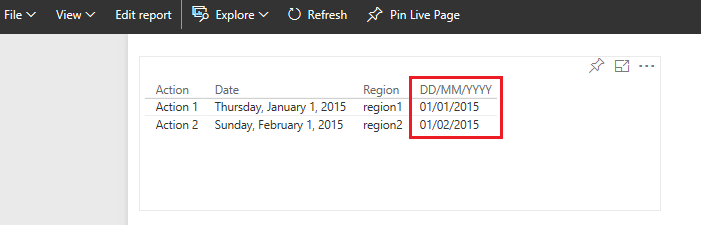
I'm not able to reproduce the issue on my side. The DAX = Format([Date],"dd/MM/yyyy" ) will work fine in Power BI service.
In your scenario, please publish the attached .PBIX file to service to see if the issue persists.
Best Regards,
Qiuyun Yu
Please choose that field and navigate to Modeling tab, and choose options in Format
In case this feature could not adapt your expectation, you could use DAX with Format function:
_ Create New Calculated Column
_ New Column = Format([DateField],"dd/MM/yyyy" )
Otherwise, You should refer discussed topic for locale setting:
https://community.powerbi.com/t5/Desktop/How-to-change-the-date-format/td-p/40460
hi! @tringuyenminh92
I have tried both the methods suggested before. I guess Modelling Tab is avilable only in Power BI desktop and not in Service.
My desktop version is correctly displaying the date as DD/MM/YYYY but once I upload to service it changes to MM/DD/YYYY this is the problem.
Thanks
Regards
Agragesh
In this case, we could wait response from some staffs or you could post this in issue forum: http://community.powerbi.com/t5/Issues/idb-p/Issues
The Power BI Data Visualization World Championships is back! It's time to submit your entry.
Check out the January 2026 Power BI update to learn about new features.
| User | Count |
|---|---|
| 24 | |
| 13 | |
| 10 | |
| 7 | |
| 5 |