cancel
Showing results for 
Search instead for 
Did you mean: 

We've captured the moments from FabCon & SQLCon that everyone is talking about, and we are bringing them to the community, live and on-demand. Starts on April 14th. Register now

Reply
agragesh123
Frequent Visitor

Date Display Format- Power BI Service

Hi!


How to change the date display format from MM/DD/YYYY to DD/MM/YYYY in power BI Service. The Date is in DD/MM/YYYY when I uploaded it from my .pbix file but in service it takes it as MM/DD/YYYY. How to change this.


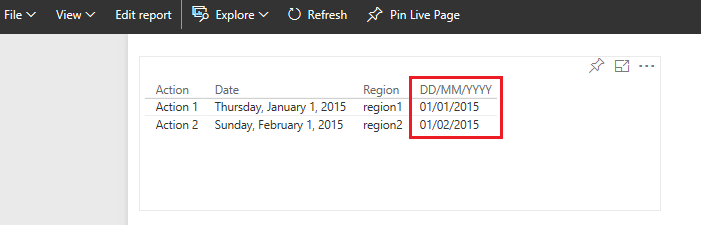
 this is in MM/DD/YYYY how to change this to DD/MM/YYYY in power bi servicethis is in MM/DD/YYYY how to change this to DD/MM/YYYY in power bi service

Please do help out


With Regards

Agragesh 

4 REPLIES 4
v-qiuyu-msft
Community Support
Community Support

Hi @agragesh123,


I'm not able to reproduce the issue on my side. The DAX = Format([Date],"dd/MM/yyyy" ) will work fine in Power BI service.


q6.PNG


In your scenario, please publish the attached .PBIX file to service to see if the issue persists.


Best Regards,
Qiuyun Yu

Community Support Team _ Qiuyun Yu
If this post helps, then please consider Accept it as the solution to help the other members find it more quickly.
tringuyenminh92
Memorable Member
Memorable Member

Please choose that field and navigate to Modeling tab, and choose options in Format


2016-12-02_17h28_53.png


In case this feature could not adapt your expectation, you could use DAX with Format function:

_ Create New Calculated Column

_ New Column = Format([DateField],"dd/MM/yyyy" )


Otherwise, You should refer discussed topic for locale setting:

https://community.powerbi.com/t5/Desktop/How-to-change-the-date-format/td-p/40460

hi! @tringuyenminh92


I have tried both the methods suggested before. I guess Modelling Tab is avilable only in Power BI desktop and not in Service. 

My desktop version is correctly displaying the date as DD/MM/YYYY but once I upload to service it changes to MM/DD/YYYY this is the problem.


Thanks 

Regards

Agragesh 

In this case, we could wait response from some staffs or you could post this in issue forum: http://community.powerbi.com/t5/Issues/idb-p/Issues 

Helpful resources

Announcements
New to Fabric survey Carousel

New to Fabric Survey

If you have recently started exploring Fabric, we'd love to hear how it's going. Your feedback can help with product improvements.

Power BI DataViz World Championships carousel

Power BI DataViz World Championships - June 2026

A new Power BI DataViz World Championship is coming this June! Don't miss out on submitting your entry.

Join our Fabric User Panel

Join our Fabric User Panel

Share feedback directly with Fabric product managers, participate in targeted research studies and influence the Fabric roadmap.

March Power BI Update Carousel

Power BI Community Update - March 2026

Check out the March 2026 Power BI update to learn about new features.

Top Solution Authors