cancel
Showing results for 
Search instead for 
Did you mean: 

Vote for your favorite vizzies from the Power BI Dataviz World Championship submissions. Vote now!

Reply
Anonymous
Not applicable

App Not Retaining Some Users

When I add new users to a PBI app, this list does not retain the users, so I can't see who has access.


However, it seems that they do get access, but it is very confusing, and how can I even remove them from the list, if they do not appear?


1 ACCEPTED SOLUTION

Hi @Anonymous ,

First, could you please check the access limitation when you update/publish your app:

1.PNG

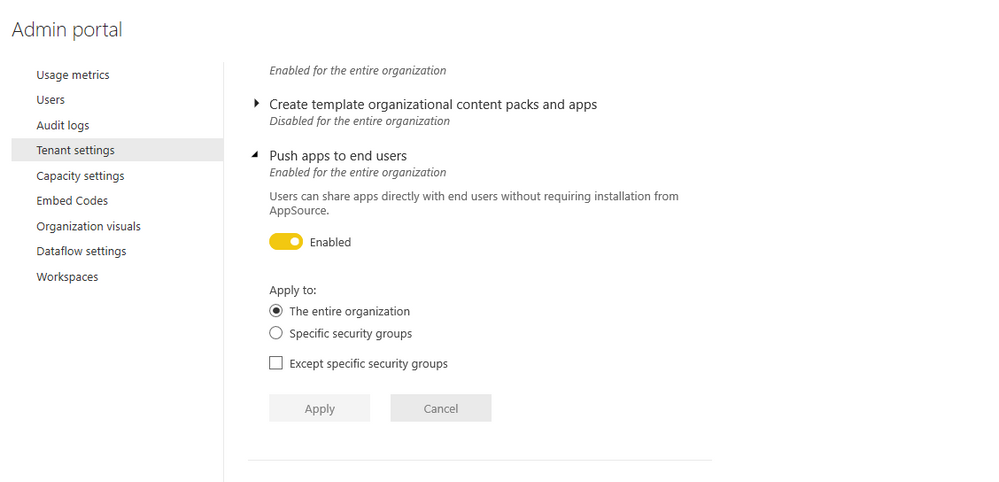
Second, please check if you have switched off the option for app in admin portal:

2.PNG

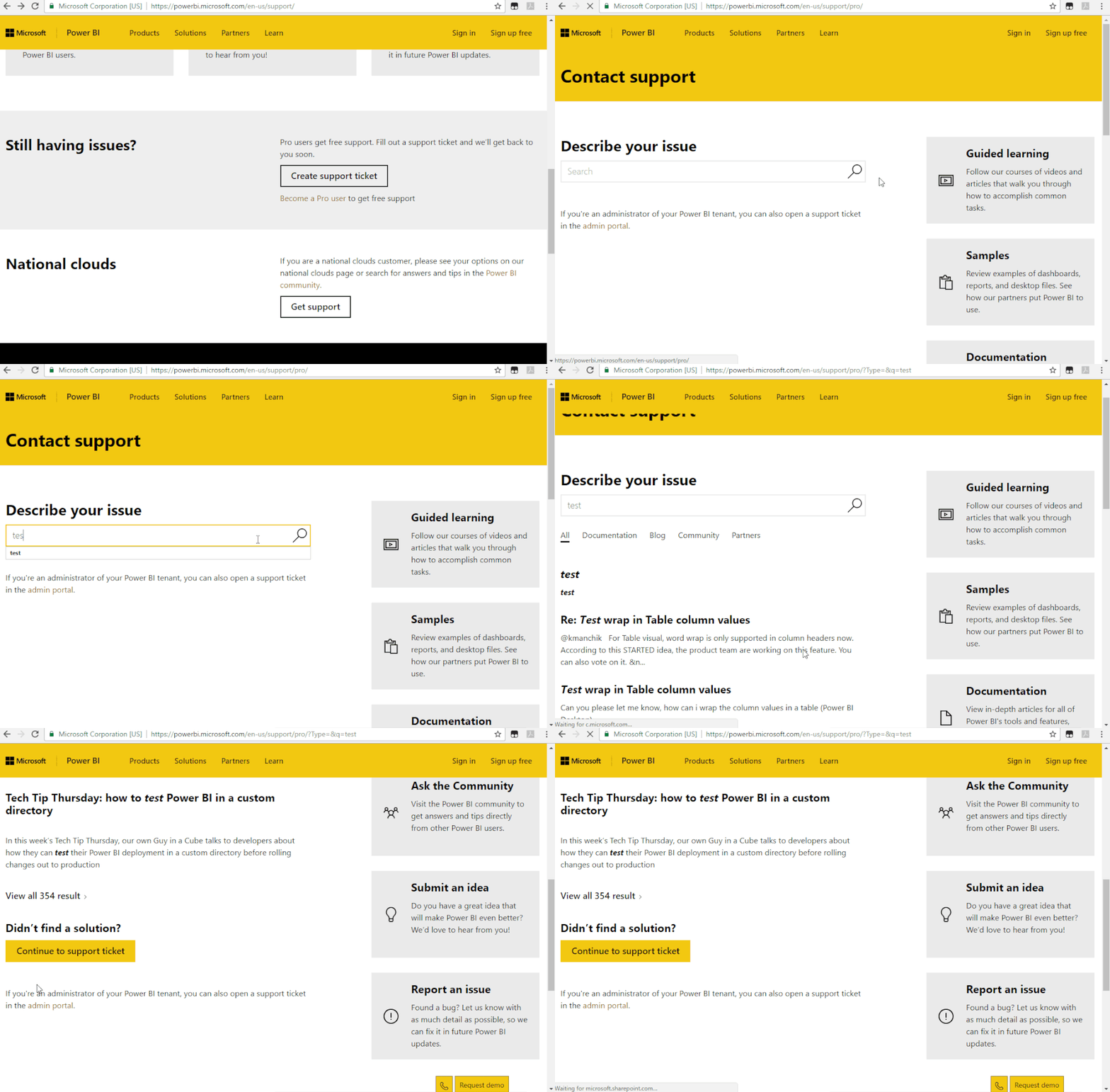
If all above solutions could help you, you could create a support ticket for your issue:https://powerbi.microsoft.com/en-us/support/

Support Ticket.gif

Regards,

Daniel He

Community Support Team _ Daniel He
If this post helps, then please consider Accept it as the solution to help the other members find it more quickly.

View solution in original post

4 REPLIES 4
v-danhe-msft
Microsoft Employee
Microsoft Employee

Hi @Anonymous ,

Could you please tell me if your problem has been solved? If it is, could you please mark the helpful replies as Answered to close this topic?


Regards,

Daniel He

Community Support Team _ Daniel He
If this post helps, then please consider Accept it as the solution to help the other members find it more quickly.
v-danhe-msft
Microsoft Employee
Microsoft Employee

Hi @Anonymous ,

"When I add new users to a PBI app"

Could you mean add users to your app workspace? If so, could you have added external users to your workspace? If so, I am afraid them could not have the access to your workspace:

https://docs.microsoft.com/en-us/power-bi/service-create-workspaces


Regards,

Daniel He

Community Support Team _ Daniel He
If this post helps, then please consider Accept it as the solution to help the other members find it more quickly.
Anonymous
Not applicable

No.... I'm specifically referring to the App attached to the workspace, which users needs access to. When we started using this back in february, this issues did not exist.


The users I'm adding are all within our organisation on Office365.

Hi @Anonymous ,

First, could you please check the access limitation when you update/publish your app:

1.PNG

Second, please check if you have switched off the option for app in admin portal:

2.PNG

If all above solutions could help you, you could create a support ticket for your issue:https://powerbi.microsoft.com/en-us/support/

Support Ticket.gif

Regards,

Daniel He

Community Support Team _ Daniel He
If this post helps, then please consider Accept it as the solution to help the other members find it more quickly.

Helpful resources

Announcements
Power BI DataViz World Championships

Power BI Dataviz World Championships

Vote for your favorite vizzies from the Power BI World Championship submissions!

Sticker Challenge 2026 Carousel

Join our Community Sticker Challenge 2026

If you love stickers, then you will definitely want to check out our Community Sticker Challenge!

January Power BI Update Carousel

Power BI Monthly Update - January 2026

Check out the January 2026 Power BI update to learn about new features.

FabCon Atlanta 2026 carousel

FabCon Atlanta 2026

Join us at FabCon Atlanta, March 16-20, for the ultimate Fabric, Power BI, AI and SQL community-led event. Save $200 with code FABCOMM.