This time we’re going bigger than ever. Fabric, Power BI, SQL, AI and more. We're covering it all. You won't want to miss it.
Learn moreDid you hear? There's a new SQL AI Developer certification (DP-800). Start preparing now and be one of the first to get certified. Register now
Hello,
I am getting so many syntax errors that I am hoping someone can guide me as to what should go where. It outputs a 0 followed by errors, at present.
CustomColumn = List.Generate(
() => [
i=0,
budget_index=0,
LastYearMax=List.Max(List.Select(RunningTotalList, each _ < #"BudgetTbl"{0}[Budget])),
result = 0,
current_running_total = RunningTotalList{[i]},
initial_condition = [current_running_total] < #"BudgetTbl"{0}[Budget],
budget_condition = [current_running_total] < ([LastYearMax] + #"BudgetTbl"{[budget_index] + 1}[Budget]),
last_year_running_total = RunningTotalList{[i]-1},
last_year_condition = [last_year_running_total] < ([LastYearMax] + #"BudgetTbl"{[budget_index] + 1}[Budget])
],
each [i] < List.Count(RunningTotalList),
each [
i = [i] + 1,
LastYearMax = List.Max(List.Select(RunningTotalList, each _ < #"BudgetTbl"{[budget_index]}[Budget])),
budget_index = Table.PositionOf(Table.Min(#"BudgetTbl"[Budget], each _ >= [current_running_total]) - 1),
current_running_total = RunningTotalList{[i]},
initial_condition = [current_running_total] < #"BudgetTbl"{0}[Budget],
budget_condition = [current_running_total] < ([LastYearMax] + #"BudgetTbl"{[budget_index] + 1}[Budget]),
last_year_running_total = RunningTotalList{[i]-1},
last_year_condition = [last_year_running_total] < ([LastYearMax] + #"BudgetTbl"{[budget_index] + 1}[Budget]),
result =
if [initial_condition] then [result] = #"BudgetTbl"{0}[Year]
else if [budget_condition] then [result = #"BudgetTbl"{[budget_index] + 1}[Year]]
else if [last_year_condition] then [result = #"BudgetTbl"{[budget_index] + 1}[Year], budget_index = [budget_index] + 1, LastYearMax = RunningTotalList{[i] - 1}]
else 0
],
each [result]
)
Any help appreciated.
Solved! Go to Solution.
Simply the formulas and take advantage of being able to refer to previous value "[i]" and next value "i".
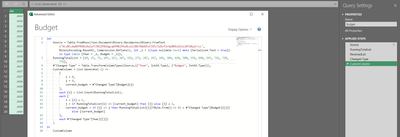
let
Source = Table.FromRows(Json.Document(Binary.Decompress(Binary.FromText("VczBCcAwDEPRXXzOwZaTtJ0lZP81Kgcq6PHBl9YyOLo1i3Db7XAUU5zFIV5/3iRcfIr4yBNScUZxiiBT20yyF/cL", BinaryEncoding.Base64), Compression.Deflate)), let _t = ((type nullable text) meta [Serialized.Text = true]) in type table [Year = _t, Budget = _t]),
RunningTotalList = {10, 25, 75, 107, 167, 187, 192, 272, 287, 297, 346, 389, 410, 500, 554, 640, 693, 716, 720, 776},
#"Changed Type" = Table.TransformColumnTypes(Source,{{"Year", Int64.Type}, {"Budget", Int64.Type}}),
CustomColumn = List.Generate( () =>
[
i = 0,
j = 0,
current_budget = #"Changed Type"[Budget]{j}
],
each [i] < List.Count(RunningTotalList),
each [
i = [i] + 1,
j = if RunningTotalList{i} <= [current_budget] then [j] else [j] + 1,
current_budget = if [j] <> j then RunningTotalList{[i]}*Byte.From(j <> 0) + #"Changed Type"[Budget]{[j]} else [current_budget]
],
each #"Changed Type"[Year]{[j]}
)
in
CustomColumn
Thank you!
Simply the formulas and take advantage of being able to refer to previous value "[i]" and next value "i".
let
Source = Table.FromRows(Json.Document(Binary.Decompress(Binary.FromText("VczBCcAwDEPRXXzOwZaTtJ0lZP81Kgcq6PHBl9YyOLo1i3Db7XAUU5zFIV5/3iRcfIr4yBNScUZxiiBT20yyF/cL", BinaryEncoding.Base64), Compression.Deflate)), let _t = ((type nullable text) meta [Serialized.Text = true]) in type table [Year = _t, Budget = _t]),
RunningTotalList = {10, 25, 75, 107, 167, 187, 192, 272, 287, 297, 346, 389, 410, 500, 554, 640, 693, 716, 720, 776},
#"Changed Type" = Table.TransformColumnTypes(Source,{{"Year", Int64.Type}, {"Budget", Int64.Type}}),
CustomColumn = List.Generate( () =>
[
i = 0,
j = 0,
current_budget = #"Changed Type"[Budget]{j}
],
each [i] < List.Count(RunningTotalList),
each [
i = [i] + 1,
j = if RunningTotalList{i} <= [current_budget] then [j] else [j] + 1,
current_budget = if [j] <> j then RunningTotalList{[i]}*Byte.From(j <> 0) + #"Changed Type"[Budget]{[j]} else [current_budget]
],
each #"Changed Type"[Year]{[j]}
)
in
CustomColumn
Check out the April 2026 Power BI update to learn about new features.
If you have recently started exploring Fabric, we'd love to hear how it's going. Your feedback can help with product improvements.
A new Power BI DataViz World Championship is coming this June! Don't miss out on submitting your entry.
| User | Count |
|---|---|
| 3 | |
| 3 | |
| 3 | |
| 2 | |
| 2 |