Share feedback directly with Fabric product managers, participate in targeted research studies and influence the Fabric roadmap.
Sign up nowGet Fabric certified for FREE! Don't miss your chance! Learn more
Hello,
I am getting so many syntax errors that I am hoping someone can guide me as to what should go where. It outputs a 0 followed by errors, at present.
CustomColumn = List.Generate(
() => [
i=0,
budget_index=0,
LastYearMax=List.Max(List.Select(RunningTotalList, each _ < #"BudgetTbl"{0}[Budget])),
result = 0,
current_running_total = RunningTotalList{[i]},
initial_condition = [current_running_total] < #"BudgetTbl"{0}[Budget],
budget_condition = [current_running_total] < ([LastYearMax] + #"BudgetTbl"{[budget_index] + 1}[Budget]),
last_year_running_total = RunningTotalList{[i]-1},
last_year_condition = [last_year_running_total] < ([LastYearMax] + #"BudgetTbl"{[budget_index] + 1}[Budget])
],
each [i] < List.Count(RunningTotalList),
each [
i = [i] + 1,
LastYearMax = List.Max(List.Select(RunningTotalList, each _ < #"BudgetTbl"{[budget_index]}[Budget])),
budget_index = Table.PositionOf(Table.Min(#"BudgetTbl"[Budget], each _ >= [current_running_total]) - 1),
current_running_total = RunningTotalList{[i]},
initial_condition = [current_running_total] < #"BudgetTbl"{0}[Budget],
budget_condition = [current_running_total] < ([LastYearMax] + #"BudgetTbl"{[budget_index] + 1}[Budget]),
last_year_running_total = RunningTotalList{[i]-1},
last_year_condition = [last_year_running_total] < ([LastYearMax] + #"BudgetTbl"{[budget_index] + 1}[Budget]),
result =
if [initial_condition] then [result] = #"BudgetTbl"{0}[Year]
else if [budget_condition] then [result = #"BudgetTbl"{[budget_index] + 1}[Year]]
else if [last_year_condition] then [result = #"BudgetTbl"{[budget_index] + 1}[Year], budget_index = [budget_index] + 1, LastYearMax = RunningTotalList{[i] - 1}]
else 0
],
each [result]
)
Any help appreciated.
Solved! Go to Solution.
Simply the formulas and take advantage of being able to refer to previous value "[i]" and next value "i".
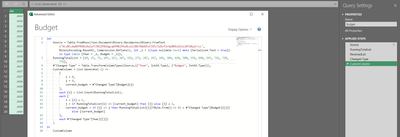
let
Source = Table.FromRows(Json.Document(Binary.Decompress(Binary.FromText("VczBCcAwDEPRXXzOwZaTtJ0lZP81Kgcq6PHBl9YyOLo1i3Db7XAUU5zFIV5/3iRcfIr4yBNScUZxiiBT20yyF/cL", BinaryEncoding.Base64), Compression.Deflate)), let _t = ((type nullable text) meta [Serialized.Text = true]) in type table [Year = _t, Budget = _t]),
RunningTotalList = {10, 25, 75, 107, 167, 187, 192, 272, 287, 297, 346, 389, 410, 500, 554, 640, 693, 716, 720, 776},
#"Changed Type" = Table.TransformColumnTypes(Source,{{"Year", Int64.Type}, {"Budget", Int64.Type}}),
CustomColumn = List.Generate( () =>
[
i = 0,
j = 0,
current_budget = #"Changed Type"[Budget]{j}
],
each [i] < List.Count(RunningTotalList),
each [
i = [i] + 1,
j = if RunningTotalList{i} <= [current_budget] then [j] else [j] + 1,
current_budget = if [j] <> j then RunningTotalList{[i]}*Byte.From(j <> 0) + #"Changed Type"[Budget]{[j]} else [current_budget]
],
each #"Changed Type"[Year]{[j]}
)
in
CustomColumn
Thank you!
Simply the formulas and take advantage of being able to refer to previous value "[i]" and next value "i".
let
Source = Table.FromRows(Json.Document(Binary.Decompress(Binary.FromText("VczBCcAwDEPRXXzOwZaTtJ0lZP81Kgcq6PHBl9YyOLo1i3Db7XAUU5zFIV5/3iRcfIr4yBNScUZxiiBT20yyF/cL", BinaryEncoding.Base64), Compression.Deflate)), let _t = ((type nullable text) meta [Serialized.Text = true]) in type table [Year = _t, Budget = _t]),
RunningTotalList = {10, 25, 75, 107, 167, 187, 192, 272, 287, 297, 346, 389, 410, 500, 554, 640, 693, 716, 720, 776},
#"Changed Type" = Table.TransformColumnTypes(Source,{{"Year", Int64.Type}, {"Budget", Int64.Type}}),
CustomColumn = List.Generate( () =>
[
i = 0,
j = 0,
current_budget = #"Changed Type"[Budget]{j}
],
each [i] < List.Count(RunningTotalList),
each [
i = [i] + 1,
j = if RunningTotalList{i} <= [current_budget] then [j] else [j] + 1,
current_budget = if [j] <> j then RunningTotalList{[i]}*Byte.From(j <> 0) + #"Changed Type"[Budget]{[j]} else [current_budget]
],
each #"Changed Type"[Year]{[j]}
)
in
CustomColumn
Share feedback directly with Fabric product managers, participate in targeted research studies and influence the Fabric roadmap.
If you love stickers, then you will definitely want to check out our Community Sticker Challenge!
Check out the January 2026 Power BI update to learn about new features.
| User | Count |
|---|---|
| 12 | |
| 11 | |
| 11 | |
| 7 | |
| 6 |