Get certified for free when you join Fabric Data Days 2026 and dive into Fabric, Power BI, SQL, AI, and other essential data skills.
Join nowJuly 28 - August 9 | Final Round of the Power BI Dataviz World Championships. This is your chance. Learn more
Hi dear Community,
I would like to extract data from Salesforce Pardot to PowerBi with a dataflow.
I was looking from some infos but couldn't find any materials.
Dos anyone know or happen to experienced that request?
Thanks all !
Best,
Hi @Anonymous Since there's no built-in connector for Pardot to PBI, you would have to use a 3rd party tool to connect your Pardot data. As a workaround, maybe you can try to test your connection with a 3rd party connector. I currently use widnsor.ai's Pardot connector and it works great. In case you wonder, to make the connection first search for the Salesforce connector in the data sources list:
After that, just grant access to your Pardot account using your credentials, then on preview and destination page you will see a preview of your Pardot fields:
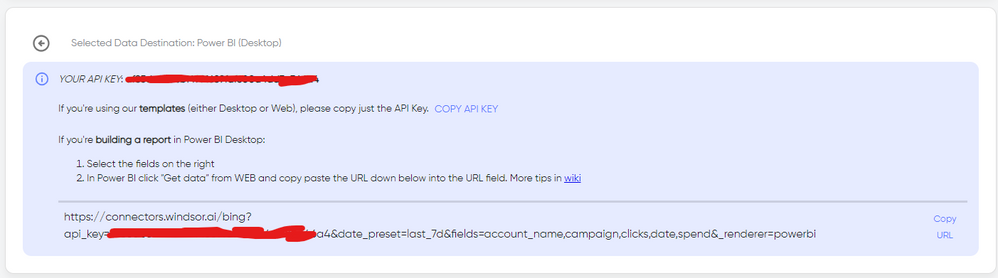
There just select the fields you need. Finally, just select PBI as your data destination and finally just copy and paste the url on PBI --> Get Data --> Web --> Paste the url.
Hi @Anonymous ,
The best practice for analyzing Pardot data in Power BI is to store that data in a data warehouse platform along with data from other databases and third-party sources. You can learn about this in the following: Pardot to Redshift, Pardot to BigQuery, Pardot to Azure Synapse Analytics, Pardot to PostgreSQL, Pardot to Panoply, and Pardot to Snowflake.
But I didn't find any information about connecting to Power BI through dataflow.
Best Regards,
Stephen Tao
If this post helps, then please consider Accept it as the solution to help the other members find it more quickly.
Join us in Barcelona for FabCon and SQLCon, the Fabric, Power BI, SQL, and AI community event. Save €200 with code FABCMTY200.
If you love stickers, then you will definitely want to check out our community sticker challenge, Barcelona edition!
Check out the July 2026 Power BI update to learn about new features.