cancel
Showing results for 
Search instead for 
Did you mean: 

Join the FabCon + SQLCon recap series. Up next: Power BI, Real-Time Intelligence, IQ and AI, and Data Factory take center stage. All sessions are available on-demand after the live show. Register now

Reply
dh76_PBI1
Frequent Visitor

While Loop in M Language Syntax

Hello, 


I am getting so many syntax errors that I am hoping someone can guide me as to what should go where. It outputs a 0 followed by errors, at present. 


    CustomColumn = List.Generate(
        () => [
            i=0, 
            budget_index=0, 
            LastYearMax=List.Max(List.Select(RunningTotalList, each _ < #"BudgetTbl"{0}[Budget])), 
            result = 0,
            current_running_total = RunningTotalList{[i]},
            initial_condition = [current_running_total] < #"BudgetTbl"{0}[Budget],
            budget_condition = [current_running_total] < ([LastYearMax] + #"BudgetTbl"{[budget_index] + 1}[Budget]),
            last_year_running_total = RunningTotalList{[i]-1},
            last_year_condition = [last_year_running_total] < ([LastYearMax] + #"BudgetTbl"{[budget_index] + 1}[Budget])
            ],
        each [i] < List.Count(RunningTotalList),
        each [
            i = [i] + 1,
            LastYearMax = List.Max(List.Select(RunningTotalList, each _ < #"BudgetTbl"{[budget_index]}[Budget])),
            budget_index = Table.PositionOf(Table.Min(#"BudgetTbl"[Budget], each _ >= [current_running_total]) - 1),
            current_running_total = RunningTotalList{[i]},
            initial_condition = [current_running_total] < #"BudgetTbl"{0}[Budget],
            budget_condition = [current_running_total] < ([LastYearMax] + #"BudgetTbl"{[budget_index] + 1}[Budget]),
            last_year_running_total = RunningTotalList{[i]-1},
            last_year_condition = [last_year_running_total] < ([LastYearMax] + #"BudgetTbl"{[budget_index] + 1}[Budget]),
            result = 
                if [initial_condition] then [result] = #"BudgetTbl"{0}[Year]
                else if [budget_condition] then [result = #"BudgetTbl"{[budget_index] + 1}[Year]]
                else if [last_year_condition] then [result = #"BudgetTbl"{[budget_index] + 1}[Year], budget_index = [budget_index] + 1, LastYearMax = RunningTotalList{[i] - 1}]
                else 0
        ],
        each [result]
    )


Any help appreciated. 

1 ACCEPTED SOLUTION
spinfuzer
Solution Sage
Solution Sage

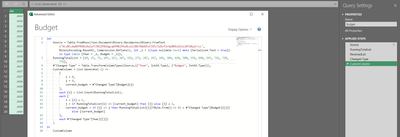
Simply the formulas and take advantage of being able to refer to previous value "[i]" and next value "i".

spinfuzer_2-1704236408363.png


let
    Source = Table.FromRows(Json.Document(Binary.Decompress(Binary.FromText("VczBCcAwDEPRXXzOwZaTtJ0lZP81Kgcq6PHBl9YyOLo1i3Db7XAUU5zFIV5/3iRcfIr4yBNScUZxiiBT20yyF/cL", BinaryEncoding.Base64), Compression.Deflate)), let _t = ((type nullable text) meta [Serialized.Text = true]) in type table [Year = _t, Budget = _t]),
    RunningTotalList = {10, 25, 75, 107, 167, 187, 192, 272, 287, 297, 346, 389, 410, 500, 554, 640, 693, 716, 720, 776},
    #"Changed Type" = Table.TransformColumnTypes(Source,{{"Year", Int64.Type}, {"Budget", Int64.Type}}),
    CustomColumn = List.Generate( () =>
        [
            i = 0, 
            j = 0, 
            current_budget = #"Changed Type"[Budget]{j}
        ],
        each [i] < List.Count(RunningTotalList),
        each [
            i = [i] + 1,
            j = if RunningTotalList{i} <= [current_budget] then [j] else [j] + 1,
            current_budget = if [j] <> j then RunningTotalList{[i]}*Byte.From(j <> 0) + #"Changed Type"[Budget]{[j]} else [current_budget]
        ],
        each #"Changed Type"[Year]{[j]} 
    )
in
    CustomColumn


View solution in original post

2 REPLIES 2
dh76_PBI1
Frequent Visitor

Thank you!

spinfuzer
Solution Sage
Solution Sage

Simply the formulas and take advantage of being able to refer to previous value "[i]" and next value "i".

spinfuzer_2-1704236408363.png


let
    Source = Table.FromRows(Json.Document(Binary.Decompress(Binary.FromText("VczBCcAwDEPRXXzOwZaTtJ0lZP81Kgcq6PHBl9YyOLo1i3Db7XAUU5zFIV5/3iRcfIr4yBNScUZxiiBT20yyF/cL", BinaryEncoding.Base64), Compression.Deflate)), let _t = ((type nullable text) meta [Serialized.Text = true]) in type table [Year = _t, Budget = _t]),
    RunningTotalList = {10, 25, 75, 107, 167, 187, 192, 272, 287, 297, 346, 389, 410, 500, 554, 640, 693, 716, 720, 776},
    #"Changed Type" = Table.TransformColumnTypes(Source,{{"Year", Int64.Type}, {"Budget", Int64.Type}}),
    CustomColumn = List.Generate( () =>
        [
            i = 0, 
            j = 0, 
            current_budget = #"Changed Type"[Budget]{j}
        ],
        each [i] < List.Count(RunningTotalList),
        each [
            i = [i] + 1,
            j = if RunningTotalList{i} <= [current_budget] then [j] else [j] + 1,
            current_budget = if [j] <> j then RunningTotalList{[i]}*Byte.From(j <> 0) + #"Changed Type"[Budget]{[j]} else [current_budget]
        ],
        each #"Changed Type"[Year]{[j]} 
    )
in
    CustomColumn


Helpful resources

Announcements
April Power BI Update Carousel

Power BI Monthly Update - April 2026

Check out the April 2026 Power BI update to learn about new features.

New to Fabric survey Carousel

New to Fabric Survey

If you have recently started exploring Fabric, we'd love to hear how it's going. Your feedback can help with product improvements.

Power BI DataViz World Championships carousel

Power BI DataViz World Championships - June 2026

A new Power BI DataViz World Championship is coming this June! Don't miss out on submitting your entry.

FabCon and SQLCon Highlights Carousel

FabCon &SQLCon Highlights

Experience the highlights from FabCon & SQLCon, available live and on-demand starting April 14th.