Join us at FabCon Atlanta from March 16 - 20, 2026, for the ultimate Fabric, Power BI, AI and SQL community-led event. Save $200 with code FABCOMM.
Register now!Vote for your favorite vizzies from the Power BI Dataviz World Championship submissions. Vote now!
Hello,
I am getting so many syntax errors that I am hoping someone can guide me as to what should go where. It outputs a 0 followed by errors, at present.
CustomColumn = List.Generate(
() => [
i=0,
budget_index=0,
LastYearMax=List.Max(List.Select(RunningTotalList, each _ < #"BudgetTbl"{0}[Budget])),
result = 0,
current_running_total = RunningTotalList{[i]},
initial_condition = [current_running_total] < #"BudgetTbl"{0}[Budget],
budget_condition = [current_running_total] < ([LastYearMax] + #"BudgetTbl"{[budget_index] + 1}[Budget]),
last_year_running_total = RunningTotalList{[i]-1},
last_year_condition = [last_year_running_total] < ([LastYearMax] + #"BudgetTbl"{[budget_index] + 1}[Budget])
],
each [i] < List.Count(RunningTotalList),
each [
i = [i] + 1,
LastYearMax = List.Max(List.Select(RunningTotalList, each _ < #"BudgetTbl"{[budget_index]}[Budget])),
budget_index = Table.PositionOf(Table.Min(#"BudgetTbl"[Budget], each _ >= [current_running_total]) - 1),
current_running_total = RunningTotalList{[i]},
initial_condition = [current_running_total] < #"BudgetTbl"{0}[Budget],
budget_condition = [current_running_total] < ([LastYearMax] + #"BudgetTbl"{[budget_index] + 1}[Budget]),
last_year_running_total = RunningTotalList{[i]-1},
last_year_condition = [last_year_running_total] < ([LastYearMax] + #"BudgetTbl"{[budget_index] + 1}[Budget]),
result =
if [initial_condition] then [result] = #"BudgetTbl"{0}[Year]
else if [budget_condition] then [result = #"BudgetTbl"{[budget_index] + 1}[Year]]
else if [last_year_condition] then [result = #"BudgetTbl"{[budget_index] + 1}[Year], budget_index = [budget_index] + 1, LastYearMax = RunningTotalList{[i] - 1}]
else 0
],
each [result]
)
Any help appreciated.
Solved! Go to Solution.
Simply the formulas and take advantage of being able to refer to previous value "[i]" and next value "i".
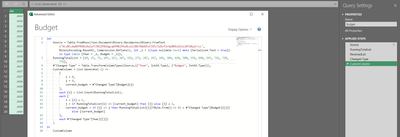
let
Source = Table.FromRows(Json.Document(Binary.Decompress(Binary.FromText("VczBCcAwDEPRXXzOwZaTtJ0lZP81Kgcq6PHBl9YyOLo1i3Db7XAUU5zFIV5/3iRcfIr4yBNScUZxiiBT20yyF/cL", BinaryEncoding.Base64), Compression.Deflate)), let _t = ((type nullable text) meta [Serialized.Text = true]) in type table [Year = _t, Budget = _t]),
RunningTotalList = {10, 25, 75, 107, 167, 187, 192, 272, 287, 297, 346, 389, 410, 500, 554, 640, 693, 716, 720, 776},
#"Changed Type" = Table.TransformColumnTypes(Source,{{"Year", Int64.Type}, {"Budget", Int64.Type}}),
CustomColumn = List.Generate( () =>
[
i = 0,
j = 0,
current_budget = #"Changed Type"[Budget]{j}
],
each [i] < List.Count(RunningTotalList),
each [
i = [i] + 1,
j = if RunningTotalList{i} <= [current_budget] then [j] else [j] + 1,
current_budget = if [j] <> j then RunningTotalList{[i]}*Byte.From(j <> 0) + #"Changed Type"[Budget]{[j]} else [current_budget]
],
each #"Changed Type"[Year]{[j]}
)
in
CustomColumn
Thank you!
Simply the formulas and take advantage of being able to refer to previous value "[i]" and next value "i".
let
Source = Table.FromRows(Json.Document(Binary.Decompress(Binary.FromText("VczBCcAwDEPRXXzOwZaTtJ0lZP81Kgcq6PHBl9YyOLo1i3Db7XAUU5zFIV5/3iRcfIr4yBNScUZxiiBT20yyF/cL", BinaryEncoding.Base64), Compression.Deflate)), let _t = ((type nullable text) meta [Serialized.Text = true]) in type table [Year = _t, Budget = _t]),
RunningTotalList = {10, 25, 75, 107, 167, 187, 192, 272, 287, 297, 346, 389, 410, 500, 554, 640, 693, 716, 720, 776},
#"Changed Type" = Table.TransformColumnTypes(Source,{{"Year", Int64.Type}, {"Budget", Int64.Type}}),
CustomColumn = List.Generate( () =>
[
i = 0,
j = 0,
current_budget = #"Changed Type"[Budget]{j}
],
each [i] < List.Count(RunningTotalList),
each [
i = [i] + 1,
j = if RunningTotalList{i} <= [current_budget] then [j] else [j] + 1,
current_budget = if [j] <> j then RunningTotalList{[i]}*Byte.From(j <> 0) + #"Changed Type"[Budget]{[j]} else [current_budget]
],
each #"Changed Type"[Year]{[j]}
)
in
CustomColumn
Vote for your favorite vizzies from the Power BI World Championship submissions!
If you love stickers, then you will definitely want to check out our Community Sticker Challenge!
Check out the January 2026 Power BI update to learn about new features.
| User | Count |
|---|---|
| 11 | |
| 9 | |
| 8 | |
| 7 | |
| 6 |