Get certified for free when you join Fabric Data Days 2026 and dive into Fabric, Power BI, SQL, AI, and other essential data skills.
Join nowJuly 28 - August 9 | Final Round of the Power BI Dataviz World Championships. This is your chance. Learn more
Hello,
I am getting so many syntax errors that I am hoping someone can guide me as to what should go where. It outputs a 0 followed by errors, at present.
CustomColumn = List.Generate(
() => [
i=0,
budget_index=0,
LastYearMax=List.Max(List.Select(RunningTotalList, each _ < #"BudgetTbl"{0}[Budget])),
result = 0,
current_running_total = RunningTotalList{[i]},
initial_condition = [current_running_total] < #"BudgetTbl"{0}[Budget],
budget_condition = [current_running_total] < ([LastYearMax] + #"BudgetTbl"{[budget_index] + 1}[Budget]),
last_year_running_total = RunningTotalList{[i]-1},
last_year_condition = [last_year_running_total] < ([LastYearMax] + #"BudgetTbl"{[budget_index] + 1}[Budget])
],
each [i] < List.Count(RunningTotalList),
each [
i = [i] + 1,
LastYearMax = List.Max(List.Select(RunningTotalList, each _ < #"BudgetTbl"{[budget_index]}[Budget])),
budget_index = Table.PositionOf(Table.Min(#"BudgetTbl"[Budget], each _ >= [current_running_total]) - 1),
current_running_total = RunningTotalList{[i]},
initial_condition = [current_running_total] < #"BudgetTbl"{0}[Budget],
budget_condition = [current_running_total] < ([LastYearMax] + #"BudgetTbl"{[budget_index] + 1}[Budget]),
last_year_running_total = RunningTotalList{[i]-1},
last_year_condition = [last_year_running_total] < ([LastYearMax] + #"BudgetTbl"{[budget_index] + 1}[Budget]),
result =
if [initial_condition] then [result] = #"BudgetTbl"{0}[Year]
else if [budget_condition] then [result = #"BudgetTbl"{[budget_index] + 1}[Year]]
else if [last_year_condition] then [result = #"BudgetTbl"{[budget_index] + 1}[Year], budget_index = [budget_index] + 1, LastYearMax = RunningTotalList{[i] - 1}]
else 0
],
each [result]
)
Any help appreciated.
Solved! Go to Solution.
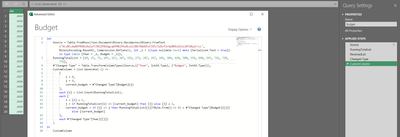
Simply the formulas and take advantage of being able to refer to previous value "[i]" and next value "i".
let
Source = Table.FromRows(Json.Document(Binary.Decompress(Binary.FromText("VczBCcAwDEPRXXzOwZaTtJ0lZP81Kgcq6PHBl9YyOLo1i3Db7XAUU5zFIV5/3iRcfIr4yBNScUZxiiBT20yyF/cL", BinaryEncoding.Base64), Compression.Deflate)), let _t = ((type nullable text) meta [Serialized.Text = true]) in type table [Year = _t, Budget = _t]),
RunningTotalList = {10, 25, 75, 107, 167, 187, 192, 272, 287, 297, 346, 389, 410, 500, 554, 640, 693, 716, 720, 776},
#"Changed Type" = Table.TransformColumnTypes(Source,{{"Year", Int64.Type}, {"Budget", Int64.Type}}),
CustomColumn = List.Generate( () =>
[
i = 0,
j = 0,
current_budget = #"Changed Type"[Budget]{j}
],
each [i] < List.Count(RunningTotalList),
each [
i = [i] + 1,
j = if RunningTotalList{i} <= [current_budget] then [j] else [j] + 1,
current_budget = if [j] <> j then RunningTotalList{[i]}*Byte.From(j <> 0) + #"Changed Type"[Budget]{[j]} else [current_budget]
],
each #"Changed Type"[Year]{[j]}
)
in
CustomColumn
Thank you!
Simply the formulas and take advantage of being able to refer to previous value "[i]" and next value "i".
let
Source = Table.FromRows(Json.Document(Binary.Decompress(Binary.FromText("VczBCcAwDEPRXXzOwZaTtJ0lZP81Kgcq6PHBl9YyOLo1i3Db7XAUU5zFIV5/3iRcfIr4yBNScUZxiiBT20yyF/cL", BinaryEncoding.Base64), Compression.Deflate)), let _t = ((type nullable text) meta [Serialized.Text = true]) in type table [Year = _t, Budget = _t]),
RunningTotalList = {10, 25, 75, 107, 167, 187, 192, 272, 287, 297, 346, 389, 410, 500, 554, 640, 693, 716, 720, 776},
#"Changed Type" = Table.TransformColumnTypes(Source,{{"Year", Int64.Type}, {"Budget", Int64.Type}}),
CustomColumn = List.Generate( () =>
[
i = 0,
j = 0,
current_budget = #"Changed Type"[Budget]{j}
],
each [i] < List.Count(RunningTotalList),
each [
i = [i] + 1,
j = if RunningTotalList{i} <= [current_budget] then [j] else [j] + 1,
current_budget = if [j] <> j then RunningTotalList{[i]}*Byte.From(j <> 0) + #"Changed Type"[Budget]{[j]} else [current_budget]
],
each #"Changed Type"[Year]{[j]}
)
in
CustomColumn
Join us in Barcelona for FabCon and SQLCon, the Fabric, Power BI, SQL, and AI community event. Save €200 with code FABCMTY200.
If you love stickers, then you will definitely want to check out our community sticker challenge, Barcelona edition!
Check out the July 2026 Power BI update to learn about new features.