Join us in Barcelona for FabCon and SQLCon, September 28 - October 1, 2026.
This is best Fabric, Power BI, SQL and AI community event. How do we know? The last event sold out! Save €200 with code FABCMTY200.
Register now- Power BI forums
- Get Help with Power BI
- Desktop
- Service
- Report Server
- Power Query
- Mobile Apps
- Developer
- DAX Commands and Tips
- Custom Visuals Development Discussion
- Health and Life Sciences
- Power BI Spanish forums
- Translated Spanish Desktop
- Training and Consulting
- Instructor Led Training
- Dashboard in a Day for Women, by Women
- Galleries
- Data Stories Gallery
- Themes Gallery
- Contests Gallery
- QuickViz Gallery
- Quick Measures Gallery
- Visual Calculations Gallery
- Fabric Apps Gallery
- Notebook Gallery
- Translytical Task Flow Gallery
- TMDL Gallery
- R Script Showcase
- Webinars and Video Gallery
- Ideas
- Custom Visuals Ideas (read-only)
- Issues
- Issues
- Events
- Upcoming Events
The Fabric community is upgrading! Read all of the details including the timeline and what you can expect. Learn more
- Power BI forums
- Forums
- Get Help with Power BI
- Power Query
- Turning a JSON API into data with Get Data and Pow...
- Subscribe to RSS Feed
- Mark Topic as New
- Mark Topic as Read
- Float this Topic for Current User
- Bookmark
- Subscribe
- Printer Friendly Page

- Mark as New
- Bookmark
- Subscribe
- Mute
- Subscribe to RSS Feed
- Permalink
- Report Inappropriate Content
Turning a JSON API into data with Get Data and Power Query
Hello,
I generated a API from a website hosting data and used it to create my power query source code which is a follows:
= Json.Document(Web.Contents("https://ec.europa.eu/eurostat/api/dissemination/statistics/1.0/data/prc_hicp_midx?format=JSON&freq=M..."))
At that point, the following is displayed. I have been searching to no avail to learn how to turn this into the data. How do I get at the data?
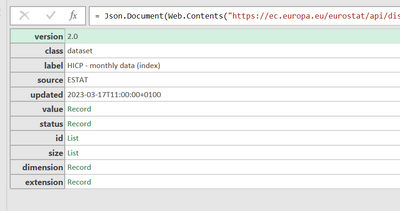
Solved! Go to Solution.


- Mark as New
- Bookmark
- Subscribe
- Mute
- Subscribe to RSS Feed
- Permalink
- Report Inappropriate Content
So, I have spent more time then I would have liked to understand the JSON response that you have and your issues. Which is kinda of a good thing to learn something new. So here is the breakdown...
- The JSON response is return is in a JSON-stat format which is a main statistical standard.
- You can spend a lot of time breaking down the response and building the table in Power BI
- I found a go to source which was very helpful at https://json-stat.org/
- Here are the instructions for how you can get the JSON in a format to be used...https://eriksvensen.wordpress.com/2019/01/09/guide-how-to-import-data-from-eurostat-directly-into-po...
YOur code to use is prc_hicp_midx
The tool URL is Tool - Query Builder - Eurostat (europa.eu)
- Mark as New
- Bookmark
- Subscribe
- Mute
- Subscribe to RSS Feed
- Permalink
- Report Inappropriate Content
I saw that the source code in Power Query was truncated so let me give the complete code incase someone would please use it to create the solution.
=Json.Document(Web.Contents("https://ec.europa.eu/eurostat/api/dissemination/statistics/1.0/data/prc_hicp_midx?format=JSON&freq=M..."))
Incase it truncates it again when i repost this, here is the code in sections.
= Json.Document(Web.Contents(
"https:
//ec.europa.eu/eurostat/api/dissemination/statistics/1.0/data/prc_hicp_midx?format=JSON&freq=M&unit=I15&coicop=CP00"))
- Mark as New
- Bookmark
- Subscribe
- Mute
- Subscribe to RSS Feed
- Permalink
- Report Inappropriate Content
What should the data look like from the response? That is to say, how is it structured in the source? Can you provide a sample or screenshot?
- Mark as New
- Bookmark
- Subscribe
- Mute
- Subscribe to RSS Feed
- Permalink
- Report Inappropriate Content

- Mark as New
- Bookmark
- Subscribe
- Mute
- Subscribe to RSS Feed
- Permalink
- Report Inappropriate Content
Are you able to change the API? The API is creating objects, but it is not well structured.
- Mark as New
- Bookmark
- Subscribe
- Mute
- Subscribe to RSS Feed
- Permalink
- Report Inappropriate Content
here is the link to the data I show above
Statistics | Eurostat (europa.eu)
https://ec.europa.eu/eurostat/databrowser/view/prc_hicp_midx/default/table?lang=en
- Mark as New
- Bookmark
- Subscribe
- Mute
- Subscribe to RSS Feed
- Permalink
- Report Inappropriate Content
So, I have spent more time then I would have liked to understand the JSON response that you have and your issues. Which is kinda of a good thing to learn something new. So here is the breakdown...
- The JSON response is return is in a JSON-stat format which is a main statistical standard.
- You can spend a lot of time breaking down the response and building the table in Power BI
- I found a go to source which was very helpful at https://json-stat.org/
- Here are the instructions for how you can get the JSON in a format to be used...https://eriksvensen.wordpress.com/2019/01/09/guide-how-to-import-data-from-eurostat-directly-into-po...
YOur code to use is prc_hicp_midx
The tool URL is Tool - Query Builder - Eurostat (europa.eu)

Helpful resources

FabCon & SQLCon – Barcelona 2026
Join us in Barcelona for FabCon and SQLCon, the Fabric, Power BI, SQL, and AI community event. Save €200 with code FABCMTY200.

Power BI DataViz World Championships - June 2026
A new Power BI DataViz World Championship is coming this June! Don't miss out on submitting your entry.


