This time we’re going bigger than ever. Fabric, Power BI, SQL, AI and more. We're covering it all. You won't want to miss it.
Learn moreLevel up your Power BI skills this month - build one visual each week and tell better stories with data! Get started
Hello,
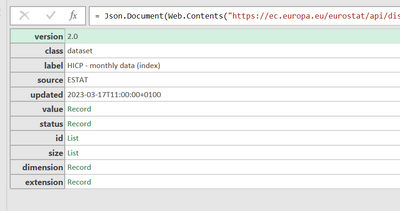
I generated a API from a website hosting data and used it to create my power query source code which is a follows:
= Json.Document(Web.Contents("https://ec.europa.eu/eurostat/api/dissemination/statistics/1.0/data/prc_hicp_midx?format=JSON&freq=M..."))
At that point, the following is displayed. I have been searching to no avail to learn how to turn this into the data. How do I get at the data?
Solved! Go to Solution.
So, I have spent more time then I would have liked to understand the JSON response that you have and your issues. Which is kinda of a good thing to learn something new. So here is the breakdown...
YOur code to use is prc_hicp_midx
The tool URL is Tool - Query Builder - Eurostat (europa.eu)
I saw that the source code in Power Query was truncated so let me give the complete code incase someone would please use it to create the solution.
=Json.Document(Web.Contents("https://ec.europa.eu/eurostat/api/dissemination/statistics/1.0/data/prc_hicp_midx?format=JSON&freq=M..."))
Incase it truncates it again when i repost this, here is the code in sections.
= Json.Document(Web.Contents(
"https:
//ec.europa.eu/eurostat/api/dissemination/statistics/1.0/data/prc_hicp_midx?format=JSON&freq=M&unit=I15&coicop=CP00"))
What should the data look like from the response? That is to say, how is it structured in the source? Can you provide a sample or screenshot?
Are you able to change the API? The API is creating objects, but it is not well structured.
here is the link to the data I show above
Statistics | Eurostat (europa.eu)
https://ec.europa.eu/eurostat/databrowser/view/prc_hicp_midx/default/table?lang=en
So, I have spent more time then I would have liked to understand the JSON response that you have and your issues. Which is kinda of a good thing to learn something new. So here is the breakdown...
YOur code to use is prc_hicp_midx
The tool URL is Tool - Query Builder - Eurostat (europa.eu)
Check out the April 2026 Power BI update to learn about new features.
Sign up to receive a private message when registration opens and key events begin.
If you have recently started exploring Fabric, we'd love to hear how it's going. Your feedback can help with product improvements.
| User | Count |
|---|---|
| 3 | |
| 2 | |
| 2 | |
| 2 | |
| 2 |