Get certified for free when you join Fabric Data Days 2026 and dive into Fabric, Power BI, SQL, AI, and other essential data skills.
Join nowJuly 28 - August 9 | Final Round of the Power BI Dataviz World Championships. This is your chance. Learn more
Hello,
I generated a API from a website hosting data and used it to create my power query source code which is a follows:
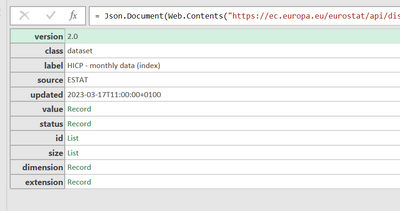
= Json.Document(Web.Contents("https://ec.europa.eu/eurostat/api/dissemination/statistics/1.0/data/prc_hicp_midx?format=JSON&freq=M..."))
At that point, the following is displayed. I have been searching to no avail to learn how to turn this into the data. How do I get at the data?
Solved! Go to Solution.
So, I have spent more time then I would have liked to understand the JSON response that you have and your issues. Which is kinda of a good thing to learn something new. So here is the breakdown...
YOur code to use is prc_hicp_midx
The tool URL is Tool - Query Builder - Eurostat (europa.eu)
I saw that the source code in Power Query was truncated so let me give the complete code incase someone would please use it to create the solution.
=Json.Document(Web.Contents("https://ec.europa.eu/eurostat/api/dissemination/statistics/1.0/data/prc_hicp_midx?format=JSON&freq=M..."))
Incase it truncates it again when i repost this, here is the code in sections.
= Json.Document(Web.Contents(
"https:
//ec.europa.eu/eurostat/api/dissemination/statistics/1.0/data/prc_hicp_midx?format=JSON&freq=M&unit=I15&coicop=CP00"))
What should the data look like from the response? That is to say, how is it structured in the source? Can you provide a sample or screenshot?
Are you able to change the API? The API is creating objects, but it is not well structured.
here is the link to the data I show above
Statistics | Eurostat (europa.eu)
https://ec.europa.eu/eurostat/databrowser/view/prc_hicp_midx/default/table?lang=en
So, I have spent more time then I would have liked to understand the JSON response that you have and your issues. Which is kinda of a good thing to learn something new. So here is the breakdown...
YOur code to use is prc_hicp_midx
The tool URL is Tool - Query Builder - Eurostat (europa.eu)
Join us in Barcelona for FabCon and SQLCon, the Fabric, Power BI, SQL, and AI community event. Save €200 with code FABCMTY200.
If you love stickers, then you will definitely want to check out our community sticker challenge, Barcelona edition!
Check out the July 2026 Power BI update to learn about new features.