cancel
Showing results for 
Search instead for 
Did you mean: 

Learn from the best! Meet the four finalists headed to the FINALS of the Power BI Dataviz World Championships! Register now

Reply
Anonymous
Not applicable

Remove App Service

Hello All,


I recently "installed" the the "Microsoft Azure Consumption Insights" Services app. The app is now available to all users in my tenant. Is there a way to "unistall" a Service app?


I've looked in the Power BI Admin portal but cannot see anything.


Thanks!


Norm

1 ACCEPTED SOLUTION
Anonymous
Not applicable

@Anonymous,

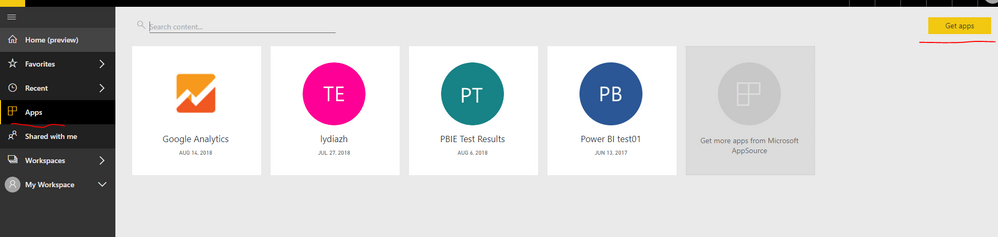
How do you install "Microsoft Azure Consumption Insights" Services app in Power BI Service? If you use the APP->Get App option as shown in the following screenshot, you should only see the "Microsoft Azure Consumption Insights" app in your Power BI Service, other users will not be able to see the app.
1.PNG

In addition, you are able to remove the app by clicking the delete icon.

1.PNG


Regards,
Lydia

View solution in original post

2 REPLIES 2
Anonymous
Not applicable

@Anonymous,

How do you install "Microsoft Azure Consumption Insights" Services app in Power BI Service? If you use the APP->Get App option as shown in the following screenshot, you should only see the "Microsoft Azure Consumption Insights" app in your Power BI Service, other users will not be able to see the app.
1.PNG

In addition, you are able to remove the app by clicking the delete icon.

1.PNG


Regards,
Lydia

Anonymous
Not applicable

Thanks for responding Lydia. I tried that yesturday and it did not carry over to others. I followed the same steps again today and it does seem to have worked. Odd.


Thanks again.


Norm

Helpful resources

Announcements
Join our Fabric User Panel

Join our Fabric User Panel

Share feedback directly with Fabric product managers, participate in targeted research studies and influence the Fabric roadmap.

March Power BI Update Carousel

Power BI Community Update - March 2026

Check out the March 2026 Power BI update to learn about new features.