Get certified for free when you join Fabric Data Days 2026 and dive into Fabric, Power BI, SQL, AI, and other essential data skills.
Join nowTry your skills in the Power BI Dataviz World Championship! Round one ends June 26. Join now
Hello All,
I recently "installed" the the "Microsoft Azure Consumption Insights" Services app. The app is now available to all users in my tenant. Is there a way to "unistall" a Service app?
I've looked in the Power BI Admin portal but cannot see anything.
Thanks!
Norm
Solved! Go to Solution.
@Anonymous,
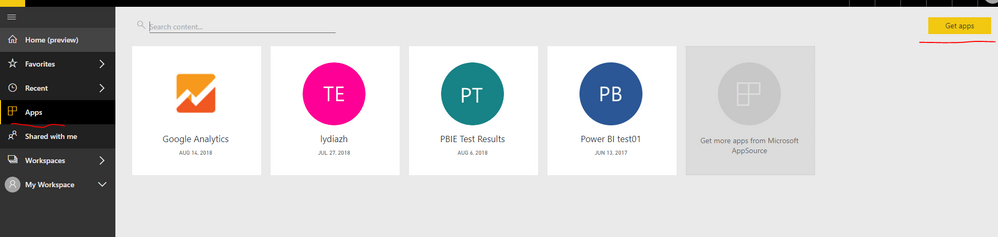
How do you install "Microsoft Azure Consumption Insights" Services app in Power BI Service? If you use the APP->Get App option as shown in the following screenshot, you should only see the "Microsoft Azure Consumption Insights" app in your Power BI Service, other users will not be able to see the app.
In addition, you are able to remove the app by clicking the delete icon.
Regards,
Lydia
@Anonymous,
How do you install "Microsoft Azure Consumption Insights" Services app in Power BI Service? If you use the APP->Get App option as shown in the following screenshot, you should only see the "Microsoft Azure Consumption Insights" app in your Power BI Service, other users will not be able to see the app.
In addition, you are able to remove the app by clicking the delete icon.
Regards,
Lydia
Thanks for responding Lydia. I tried that yesturday and it did not carry over to others. I followed the same steps again today and it does seem to have worked. Odd.
Thanks again.
Norm
| User | Count |
|---|---|
| 3 | |
| 3 | |
| 2 | |
| 2 | |
| 2 |
| User | Count |
|---|---|
| 11 | |
| 9 | |
| 5 | |
| 5 | |
| 4 |