We've captured the moments from FabCon & SQLCon that everyone is talking about, and we are bringing them to the community, live and on-demand. Starts on April 14th. Register now
Hello All,
I recently "installed" the the "Microsoft Azure Consumption Insights" Services app. The app is now available to all users in my tenant. Is there a way to "unistall" a Service app?
I've looked in the Power BI Admin portal but cannot see anything.
Thanks!
Norm
Solved! Go to Solution.
@Anonymous,
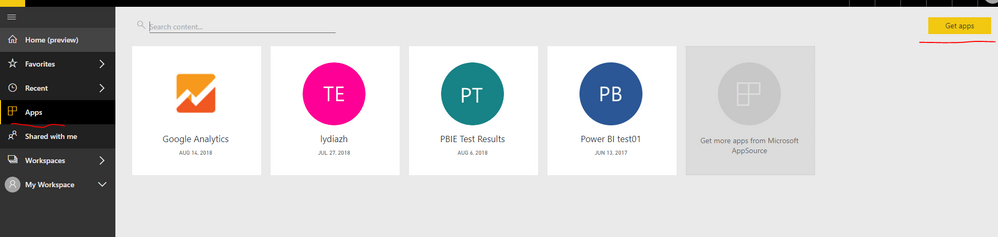
How do you install "Microsoft Azure Consumption Insights" Services app in Power BI Service? If you use the APP->Get App option as shown in the following screenshot, you should only see the "Microsoft Azure Consumption Insights" app in your Power BI Service, other users will not be able to see the app.
In addition, you are able to remove the app by clicking the delete icon.
Regards,
Lydia
@Anonymous,
How do you install "Microsoft Azure Consumption Insights" Services app in Power BI Service? If you use the APP->Get App option as shown in the following screenshot, you should only see the "Microsoft Azure Consumption Insights" app in your Power BI Service, other users will not be able to see the app.
In addition, you are able to remove the app by clicking the delete icon.
Regards,
Lydia
Thanks for responding Lydia. I tried that yesturday and it did not carry over to others. I followed the same steps again today and it does seem to have worked. Odd.
Thanks again.
Norm
If you have recently started exploring Fabric, we'd love to hear how it's going. Your feedback can help with product improvements.
A new Power BI DataViz World Championship is coming this June! Don't miss out on submitting your entry.
Share feedback directly with Fabric product managers, participate in targeted research studies and influence the Fabric roadmap.
| User | Count |
|---|---|
| 5 | |
| 3 | |
| 3 | |
| 2 | |
| 2 |
| User | Count |
|---|---|
| 10 | |
| 8 | |
| 7 | |
| 7 | |
| 5 |