We've captured the moments from FabCon & SQLCon that everyone is talking about, and we are bringing them to the community, live and on-demand. Starts on April 14th. Register now
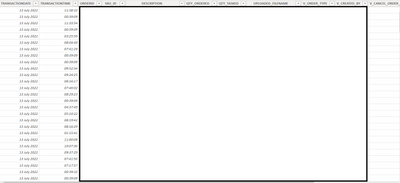
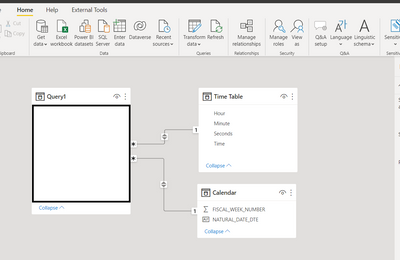
Hi I have the below table that is pulled from a SQL data base which includes a time column. When I try to filter the page by the time column using a relative time filter the table goes blank. Followed the standard practive and converted the value to a time. I have also added a Date table and time table and linked them as per the picture to Date and Time on the query to try to fix. The end goal is to just have a table that only shows the last 2 hours of data. I must be missing something any help would be great.
Solved! Go to Solution.
Create a custom column named TRANSACTIONDATETIME and put following formula to combine date and time
=[TRANSACTIONDATE]&[TRANSACTIONTIME]Now apply following statement to filter for within last 2 hours
= Table.SelectRows(#"Added Custom", each (DateTime.IsInPreviousNHours([TRANSACTIONDATETIME],2)))See the working here - Open a blank query - Home - Advanced Editor - Remove everything from there and paste the below code to test
let
Source = Table.FromRows(Json.Document(Binary.Decompress(Binary.FromText("i45WMtc3NNI3MjAyUtJRMjSwMjSyMjRRcPRVitUByxnD5EysTM2sjIwVAjClgFqMrUxMsUkZA7XApGIB", BinaryEncoding.Base64), Compression.Deflate)), let _t = ((type nullable text) meta [Serialized.Text = true]) in type table [TRANSACTIONDATE = _t, TRANSACTIONTIME = _t]),
#"Changed Type" = Table.TransformColumnTypes(Source,{{"TRANSACTIONDATE", type date}, {"TRANSACTIONTIME", type time}}),
#"Added Custom" = Table.AddColumn(#"Changed Type", "TRANSACTIONDATETIME", each [TRANSACTIONDATE]&[TRANSACTIONTIME], type datetime),
#"Filtered Rows" = Table.SelectRows(#"Added Custom", each (DateTime.IsInPreviousNHours([TRANSACTIONDATETIME],2)))
in
#"Filtered Rows"
See the step #"Filtered Rows".
If you are putting in the formula bar, then put following
= Table.SelectRows(#"Added Custom", each (DateTime.IsInPreviousNHours([TRANSACTIONDATETIME],2)))If you are putting in Advanced editor, then following
#"Filtered Rows" = Table.SelectRows(#"Added Custom", each (DateTime.IsInPreviousNHours([TRANSACTIONDATETIME],2)))
Create a custom column named TRANSACTIONDATETIME and put following formula to combine date and time
=[TRANSACTIONDATE]&[TRANSACTIONTIME]Now apply following statement to filter for within last 2 hours
= Table.SelectRows(#"Added Custom", each (DateTime.IsInPreviousNHours([TRANSACTIONDATETIME],2)))See the working here - Open a blank query - Home - Advanced Editor - Remove everything from there and paste the below code to test
let
Source = Table.FromRows(Json.Document(Binary.Decompress(Binary.FromText("i45WMtc3NNI3MjAyUtJRMjSwMjSyMjRRcPRVitUByxnD5EysTM2sjIwVAjClgFqMrUxMsUkZA7XApGIB", BinaryEncoding.Base64), Compression.Deflate)), let _t = ((type nullable text) meta [Serialized.Text = true]) in type table [TRANSACTIONDATE = _t, TRANSACTIONTIME = _t]),
#"Changed Type" = Table.TransformColumnTypes(Source,{{"TRANSACTIONDATE", type date}, {"TRANSACTIONTIME", type time}}),
#"Added Custom" = Table.AddColumn(#"Changed Type", "TRANSACTIONDATETIME", each [TRANSACTIONDATE]&[TRANSACTIONTIME], type datetime),
#"Filtered Rows" = Table.SelectRows(#"Added Custom", each (DateTime.IsInPreviousNHours([TRANSACTIONDATETIME],2)))
in
#"Filtered Rows"
Thanks for the reply. Not sure what you mean by "Now apply following statement to filter for within last 2 hours" can you advise where this goes. The rest I'm fine with
See the step #"Filtered Rows".
If you are putting in the formula bar, then put following
= Table.SelectRows(#"Added Custom", each (DateTime.IsInPreviousNHours([TRANSACTIONDATETIME],2)))If you are putting in Advanced editor, then following
#"Filtered Rows" = Table.SelectRows(#"Added Custom", each (DateTime.IsInPreviousNHours([TRANSACTIONDATETIME],2)))
If you have recently started exploring Fabric, we'd love to hear how it's going. Your feedback can help with product improvements.
A new Power BI DataViz World Championship is coming this June! Don't miss out on submitting your entry.
Share feedback directly with Fabric product managers, participate in targeted research studies and influence the Fabric roadmap.
| User | Count |
|---|---|
| 5 | |
| 3 | |
| 3 | |
| 2 | |
| 2 |
| User | Count |
|---|---|
| 11 | |
| 10 | |
| 7 | |
| 6 | |
| 5 |