Get certified for free when you join Fabric Data Days 2026 and dive into Fabric, Power BI, SQL, AI, and other essential data skills.
Join nowData Days is here! Join us now for 60+ days of learning, challenges, and connection. Learn more
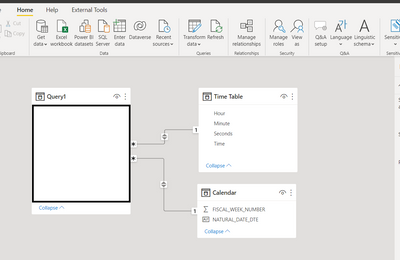
Hi I have the below table that is pulled from a SQL data base which includes a time column. When I try to filter the page by the time column using a relative time filter the table goes blank. Followed the standard practive and converted the value to a time. I have also added a Date table and time table and linked them as per the picture to Date and Time on the query to try to fix. The end goal is to just have a table that only shows the last 2 hours of data. I must be missing something any help would be great.
Solved! Go to Solution.
Create a custom column named TRANSACTIONDATETIME and put following formula to combine date and time
=[TRANSACTIONDATE]&[TRANSACTIONTIME]Now apply following statement to filter for within last 2 hours
= Table.SelectRows(#"Added Custom", each (DateTime.IsInPreviousNHours([TRANSACTIONDATETIME],2)))See the working here - Open a blank query - Home - Advanced Editor - Remove everything from there and paste the below code to test
let
Source = Table.FromRows(Json.Document(Binary.Decompress(Binary.FromText("i45WMtc3NNI3MjAyUtJRMjSwMjSyMjRRcPRVitUByxnD5EysTM2sjIwVAjClgFqMrUxMsUkZA7XApGIB", BinaryEncoding.Base64), Compression.Deflate)), let _t = ((type nullable text) meta [Serialized.Text = true]) in type table [TRANSACTIONDATE = _t, TRANSACTIONTIME = _t]),
#"Changed Type" = Table.TransformColumnTypes(Source,{{"TRANSACTIONDATE", type date}, {"TRANSACTIONTIME", type time}}),
#"Added Custom" = Table.AddColumn(#"Changed Type", "TRANSACTIONDATETIME", each [TRANSACTIONDATE]&[TRANSACTIONTIME], type datetime),
#"Filtered Rows" = Table.SelectRows(#"Added Custom", each (DateTime.IsInPreviousNHours([TRANSACTIONDATETIME],2)))
in
#"Filtered Rows"
See the step #"Filtered Rows".
If you are putting in the formula bar, then put following
= Table.SelectRows(#"Added Custom", each (DateTime.IsInPreviousNHours([TRANSACTIONDATETIME],2)))If you are putting in Advanced editor, then following
#"Filtered Rows" = Table.SelectRows(#"Added Custom", each (DateTime.IsInPreviousNHours([TRANSACTIONDATETIME],2)))
Create a custom column named TRANSACTIONDATETIME and put following formula to combine date and time
=[TRANSACTIONDATE]&[TRANSACTIONTIME]Now apply following statement to filter for within last 2 hours
= Table.SelectRows(#"Added Custom", each (DateTime.IsInPreviousNHours([TRANSACTIONDATETIME],2)))See the working here - Open a blank query - Home - Advanced Editor - Remove everything from there and paste the below code to test
let
Source = Table.FromRows(Json.Document(Binary.Decompress(Binary.FromText("i45WMtc3NNI3MjAyUtJRMjSwMjSyMjRRcPRVitUByxnD5EysTM2sjIwVAjClgFqMrUxMsUkZA7XApGIB", BinaryEncoding.Base64), Compression.Deflate)), let _t = ((type nullable text) meta [Serialized.Text = true]) in type table [TRANSACTIONDATE = _t, TRANSACTIONTIME = _t]),
#"Changed Type" = Table.TransformColumnTypes(Source,{{"TRANSACTIONDATE", type date}, {"TRANSACTIONTIME", type time}}),
#"Added Custom" = Table.AddColumn(#"Changed Type", "TRANSACTIONDATETIME", each [TRANSACTIONDATE]&[TRANSACTIONTIME], type datetime),
#"Filtered Rows" = Table.SelectRows(#"Added Custom", each (DateTime.IsInPreviousNHours([TRANSACTIONDATETIME],2)))
in
#"Filtered Rows"
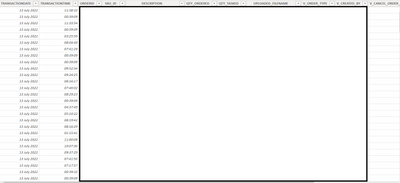
Thanks for the reply. Not sure what you mean by "Now apply following statement to filter for within last 2 hours" can you advise where this goes. The rest I'm fine with
See the step #"Filtered Rows".
If you are putting in the formula bar, then put following
= Table.SelectRows(#"Added Custom", each (DateTime.IsInPreviousNHours([TRANSACTIONDATETIME],2)))If you are putting in Advanced editor, then following
#"Filtered Rows" = Table.SelectRows(#"Added Custom", each (DateTime.IsInPreviousNHours([TRANSACTIONDATETIME],2)))
Don't miss out on Data Days, June 15 through August 7. Learn Fabric, Power BI, SQL, AI and more.
Check out the May 2026 Power BI update to learn about new features.
| User | Count |
|---|---|
| 4 | |
| 4 | |
| 3 | |
| 2 | |
| 1 |
| User | Count |
|---|---|
| 11 | |
| 11 | |
| 5 | |
| 4 | |
| 3 |