cancel
Showing results for 
Search instead for 
Did you mean: 

The Power BI Data Visualization World Championships is back! Get ahead of the game and start preparing now! Learn more

Reply
Anonymous
Not applicable

Relative Time Filter Not Working

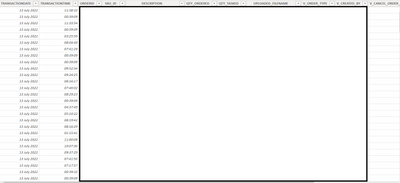
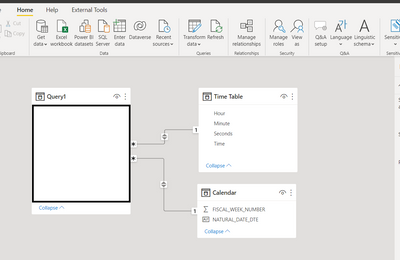
Hi I have the below table that is pulled from a SQL data base which includes a time column. When I try to filter the page by the time column using a relative time filter the table goes blank. Followed the standard practive and converted the value to a time. I have also added a Date table and time table and linked them as per the picture to Date and Time on the query to try to fix. The end goal is to just have a table that only shows the last 2 hours of data. I must be missing something any help would be great.


C4178756_0-1657710431164.png

C4178756_1-1657710485533.png


2 ACCEPTED SOLUTIONS
Vijay_A_Verma
Super User
Super User

Create a custom column named TRANSACTIONDATETIME and put following formula to combine date and time

=[TRANSACTIONDATE]&[TRANSACTIONTIME]

Now apply following statement to filter for within last 2 hours

= Table.SelectRows(#"Added Custom", each (DateTime.IsInPreviousNHours([TRANSACTIONDATETIME],2)))

 See the working here - Open a blank query - Home - Advanced Editor - Remove everything from there and paste the below code to test 

let
    Source = Table.FromRows(Json.Document(Binary.Decompress(Binary.FromText("i45WMtc3NNI3MjAyUtJRMjSwMjSyMjRRcPRVitUByxnD5EysTM2sjIwVAjClgFqMrUxMsUkZA7XApGIB", BinaryEncoding.Base64), Compression.Deflate)), let _t = ((type nullable text) meta [Serialized.Text = true]) in type table [TRANSACTIONDATE = _t, TRANSACTIONTIME = _t]),
    #"Changed Type" = Table.TransformColumnTypes(Source,{{"TRANSACTIONDATE", type date}, {"TRANSACTIONTIME", type time}}),
    #"Added Custom" = Table.AddColumn(#"Changed Type", "TRANSACTIONDATETIME", each [TRANSACTIONDATE]&[TRANSACTIONTIME], type datetime),
    #"Filtered Rows" = Table.SelectRows(#"Added Custom", each (DateTime.IsInPreviousNHours([TRANSACTIONDATETIME],2)))
in
    #"Filtered Rows"

View solution in original post

See the step #"Filtered Rows".

If you are putting in the formula bar, then put following

= Table.SelectRows(#"Added Custom", each (DateTime.IsInPreviousNHours([TRANSACTIONDATETIME],2)))

If you are putting in Advanced editor, then following

 #"Filtered Rows" = Table.SelectRows(#"Added Custom", each (DateTime.IsInPreviousNHours([TRANSACTIONDATETIME],2)))

View solution in original post

3 REPLIES 3
Vijay_A_Verma
Super User
Super User

Create a custom column named TRANSACTIONDATETIME and put following formula to combine date and time

=[TRANSACTIONDATE]&[TRANSACTIONTIME]

Now apply following statement to filter for within last 2 hours

= Table.SelectRows(#"Added Custom", each (DateTime.IsInPreviousNHours([TRANSACTIONDATETIME],2)))

 See the working here - Open a blank query - Home - Advanced Editor - Remove everything from there and paste the below code to test 

let
    Source = Table.FromRows(Json.Document(Binary.Decompress(Binary.FromText("i45WMtc3NNI3MjAyUtJRMjSwMjSyMjRRcPRVitUByxnD5EysTM2sjIwVAjClgFqMrUxMsUkZA7XApGIB", BinaryEncoding.Base64), Compression.Deflate)), let _t = ((type nullable text) meta [Serialized.Text = true]) in type table [TRANSACTIONDATE = _t, TRANSACTIONTIME = _t]),
    #"Changed Type" = Table.TransformColumnTypes(Source,{{"TRANSACTIONDATE", type date}, {"TRANSACTIONTIME", type time}}),
    #"Added Custom" = Table.AddColumn(#"Changed Type", "TRANSACTIONDATETIME", each [TRANSACTIONDATE]&[TRANSACTIONTIME], type datetime),
    #"Filtered Rows" = Table.SelectRows(#"Added Custom", each (DateTime.IsInPreviousNHours([TRANSACTIONDATETIME],2)))
in
    #"Filtered Rows"
Anonymous
Not applicable

Thanks for the reply. Not sure what you mean by "Now apply following statement to filter for within last 2 hours" can you advise where this goes. The rest I'm fine with

See the step #"Filtered Rows".

If you are putting in the formula bar, then put following

= Table.SelectRows(#"Added Custom", each (DateTime.IsInPreviousNHours([TRANSACTIONDATETIME],2)))

If you are putting in Advanced editor, then following

 #"Filtered Rows" = Table.SelectRows(#"Added Custom", each (DateTime.IsInPreviousNHours([TRANSACTIONDATETIME],2)))

Helpful resources

Announcements
Power BI DataViz World Championships

Power BI Dataviz World Championships

The Power BI Data Visualization World Championships is back! Get ahead of the game and start preparing now!

December 2025 Power BI Update Carousel

Power BI Monthly Update - December 2025

Check out the December 2025 Power BI Holiday Recap!

FabCon Atlanta 2026 carousel

FabCon Atlanta 2026

Join us at FabCon Atlanta, March 16-20, for the ultimate Fabric, Power BI, AI and SQL community-led event. Save $200 with code FABCOMM.