
cancel
Showing results for 
Search instead for 
Did you mean: 

Next up in the FabCon + SQLCon recap series: The roadmap for Microsoft SQL and Maximizing Developer experiences in Fabric. All sessions are available on-demand after the live show. Register now

Reply
Anonymous
Not applicable

Formatting

Hi All, 


I am working on managing my data in power query and have run into an issue i can not solve. I am working on client info from Open Air and have created a new column called "Unique ID" using the concatenate function combining project name and number. From here i have right clicked on my "project number" column and "replaced values" so that the null items in my column will be replaced with "999999" to follow the 6 digit format. We originally thought all of the values contained 6 digits and have come to find some are 4 and 5 digit numbers. From there noticing formating issues with the formula working for 99% of the project names but the other 1% being dashes in the wrong places due to human error in Open Air. Wondering if there is a DAX formula to fix these two formatting issues?

1 REPLY 1
gpoggi
Responsive Resident
Responsive Resident

Hi @Anonymous ,


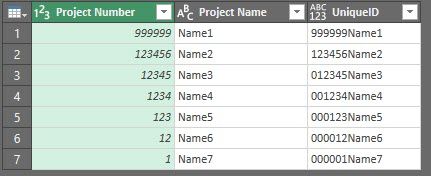
You can do it in Power Query as well, let's say you have this table:

Table1.jpg


So just go to Add Column / Custom Column and use Text.PadStart function:


Text.PadStart(Text.From([Project Number]),6,"0")
&
[Project Name]

You will get an Unique ID like this:

Table2.jpg


So as you can see it doesn't matter if the project number has < 6 digits, it will complete it with "0" or any character you decide.


Hope this helps.


Regards,


Gian Carlo Poggi

Helpful resources

Announcements
New to Fabric survey Carousel

New to Fabric Survey

If you have recently started exploring Fabric, we'd love to hear how it's going. Your feedback can help with product improvements.

Power BI DataViz World Championships carousel

Power BI DataViz World Championships - June 2026

A new Power BI DataViz World Championship is coming this June! Don't miss out on submitting your entry.

Join our Fabric User Panel

Join our Fabric User Panel

Share feedback directly with Fabric product managers, participate in targeted research studies and influence the Fabric roadmap.

March Power BI Update Carousel

Power BI Community Update - March 2026

Check out the March 2026 Power BI update to learn about new features.