Don't miss your chance to take the Fabric Data Engineer (DP-600) exam for FREE! Find out how by attending the DP-600 session on April 23rd (pacific time), live or on-demand.
Learn moreNext up in the FabCon + SQLCon recap series: The roadmap for Microsoft SQL and Maximizing Developer experiences in Fabric. All sessions are available on-demand after the live show. Register now
Hi - I'm trying to get the median and mean rent ranges for each of the # of bedroom "sections" from the spreadsheet below.
In the sample spreadsheet, rows 2-82 are all for 1 zip code (zcta - column A). Then, in column D, for every # of bedrooms, i.e., cell E2 ("1 bedroom"), then the next 26 rows show the rent ranges for 1 bedrooms. After that, it goes onto 2 bedroom rent ranges (and that section of additional 26 rows).
Out of that data, for each rent range (1 bedroom, 2 bedrooms, etc), I'm trying to get
1 bedroom: $750 to $799 (because it has the most "count" from num_estimate)
2 bedroom: $1,000 to $1,249 (because it has the most "count" from num_estimate)
So, I'm hoping I can get the data to look similar to this
Zip code | # of rooms | Best Rent Range
60002 | 1 | $750-$799
60002 | 2 | $1,000 to $1,249
60002..... 3 etc.
60004 | 1 | $1,000 to $1,249
Can anyone help here? Or if you have better suggestions or more accurate ones, let me know!
Solved! Go to Solution.
Hi @saturation
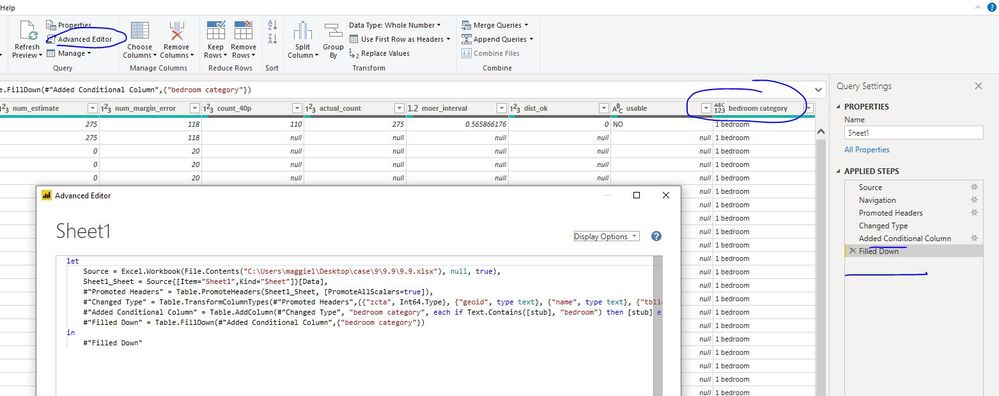
In Edit queries,
Added Conditional Column, then Filled Down.
#"Added Conditional Column" = Table.AddColumn(#"Changed Type", "bedroom category", each if Text.Contains([stub], "bedroom") then [stub] else null),
#"Filled Down" = Table.FillDown(#"Added Conditional Column",{"bedroom category"})
Close&&apply
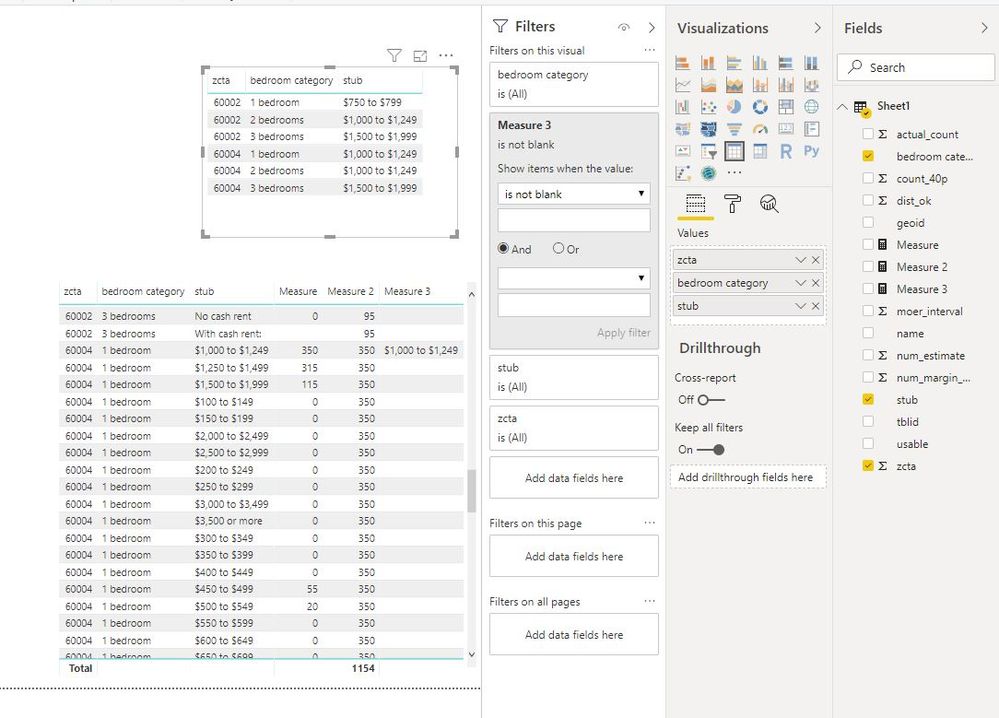
Create measures
Measure =
CALCULATE (
SUM ( Sheet1[num_estimate] ),
FILTER (
ALLEXCEPT ( Sheet1, Sheet1[zcta], Sheet1[bedroom category] ),
Sheet1[stub] = MAX ( Sheet1[stub] )
&& Sheet1[stub] <> "With cash rent:"
&& Sheet1[stub] <> "Less than $100"
&& SEARCH ( "bedroom", MAX ( Sheet1[stub] ), 1, 0 ) = 0
)
)
Measure 2 = MAXX(ALLEXCEPT(Sheet1,Sheet1[zcta],Sheet1[bedroom category]),[Measure])
Measure 3 = IF([Measure]=[Measure 2],MAX(Sheet1[stub]))
Best Regards
Maggie
Community Support Team _ Maggie Li
If this post helps, then please consider Accept it as the solution to help the other members find it more quickly.
Hi @saturation
In Edit queries,
Added Conditional Column, then Filled Down.
#"Added Conditional Column" = Table.AddColumn(#"Changed Type", "bedroom category", each if Text.Contains([stub], "bedroom") then [stub] else null),
#"Filled Down" = Table.FillDown(#"Added Conditional Column",{"bedroom category"})
Close&&apply
Create measures
Measure =
CALCULATE (
SUM ( Sheet1[num_estimate] ),
FILTER (
ALLEXCEPT ( Sheet1, Sheet1[zcta], Sheet1[bedroom category] ),
Sheet1[stub] = MAX ( Sheet1[stub] )
&& Sheet1[stub] <> "With cash rent:"
&& Sheet1[stub] <> "Less than $100"
&& SEARCH ( "bedroom", MAX ( Sheet1[stub] ), 1, 0 ) = 0
)
)
Measure 2 = MAXX(ALLEXCEPT(Sheet1,Sheet1[zcta],Sheet1[bedroom category]),[Measure])
Measure 3 = IF([Measure]=[Measure 2],MAX(Sheet1[stub]))
Best Regards
Maggie
Community Support Team _ Maggie Li
If this post helps, then please consider Accept it as the solution to help the other members find it more quickly.
Wow that's cool. Thank you for your help! Learn something new every day 🙂
If you have recently started exploring Fabric, we'd love to hear how it's going. Your feedback can help with product improvements.
A new Power BI DataViz World Championship is coming this June! Don't miss out on submitting your entry.
Share feedback directly with Fabric product managers, participate in targeted research studies and influence the Fabric roadmap.
| User | Count |
|---|---|
| 5 | |
| 3 | |
| 3 | |
| 3 | |
| 2 |