
Get certified for free when you join Fabric Data Days 2026 and dive into Fabric, Power BI, SQL, AI, and other essential data skills.
Join nowJuly 28 - August 9 | Final Round of the Power BI Dataviz World Championships. This is your chance. Learn more
Hi All,
I am working on managing my data in power query and have run into an issue i can not solve. I am working on client info from Open Air and have created a new column called "Unique ID" using the concatenate function combining project name and number. From here i have right clicked on my "project number" column and "replaced values" so that the null items in my column will be replaced with "999999" to follow the 6 digit format. We originally thought all of the values contained 6 digits and have come to find some are 4 and 5 digit numbers. From there noticing formating issues with the formula working for 99% of the project names but the other 1% being dashes in the wrong places due to human error in Open Air. Wondering if there is a DAX formula to fix these two formatting issues?
Hi @Anonymous ,
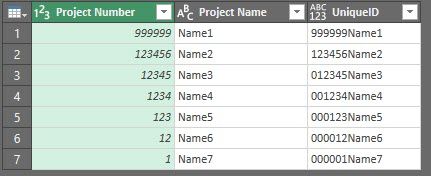
You can do it in Power Query as well, let's say you have this table:
So just go to Add Column / Custom Column and use Text.PadStart function:
Text.PadStart(Text.From([Project Number]),6,"0") & [Project Name]
You will get an Unique ID like this:
So as you can see it doesn't matter if the project number has < 6 digits, it will complete it with "0" or any character you decide.
Hope this helps.
Regards,
Gian Carlo Poggi
If you love stickers, then you will definitely want to check out our community sticker challenge, Barcelona edition!
Check out the July 2026 Power BI update to learn about new features.