This is best Fabric, Power BI, SQL and AI community event. How do we know? The last event sold out! Save €200 with code FABCMTY200.
Register nowA new Data Days event is coming soon! This time we’re going bigger than ever. Fabric, Power BI, SQL, AI and more. Don't miss out.
Hi Everyone,
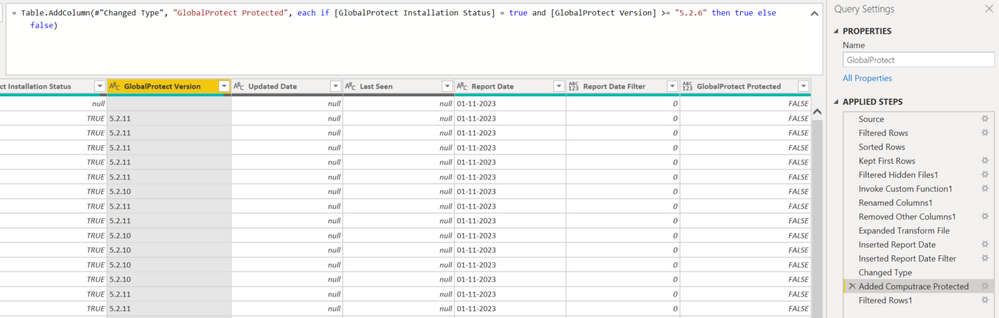
I created a conditional statement for a custom column. I have two sets of columns I'm using to determine the custom column's value.
IF (Installation Status = True) & (Version >= 8.2.6) then the custom column called Protected will be True.
However, for all the records where Version is 8.2.11 and such the column Protected is showing as False. My intuition is telling me this issue has something to do with comparing characters? But I'm not exactly sure how to resolve this.
Any suggestions or advice would be helpful. Thanks in advance for your expertise and time!
Solved! Go to Solution.
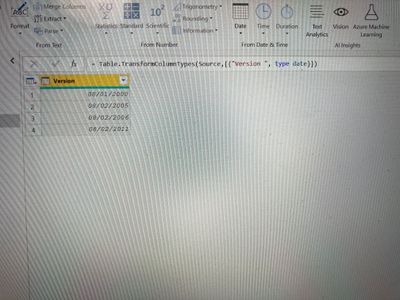
@Anonymous - quick workaround is by changing the data type of version column to Date and you will get a comparable column as shown below and then you use a conditional column.
If this post helps to find solution would be happy if you could mark my post as a solution and give it a thumbs up
Best regards
Manoj Nair
Linkedin - https://www.linkedin.com/in/manoj-nair-%E2%98%81-344666104/
@Anonymous - quick workaround is by changing the data type of version column to Date and you will get a comparable column as shown below and then you use a conditional column.
If this post helps to find solution would be happy if you could mark my post as a solution and give it a thumbs up
Best regards
Manoj Nair
Linkedin - https://www.linkedin.com/in/manoj-nair-%E2%98%81-344666104/
Hi @Anonymous - your intuition is correct. When Alphanumeric ordering occurs the 6 is greater that 11 because the 6 is compared to the first character. I would suggest trying to format the number by adding leading zeros. For example, convert from "8.2.11" to "08.02.11".
Try using:
Text.Split - PowerQuery M | Microsoft Learn
List.Transform - PowerQuery M | Microsoft Learn
Text.PadStart - PowerQuery M | Microsoft Learn
Text.Combine - PowerQuery M | Microsoft Learn
let
Source = Table.FromRows(Json.Document(Binary.Decompress(Binary.FromText("i45WstAz0jNTitWBsAwNwUxDYz0QUoqNBQA=", BinaryEncoding.Base64), Compression.Deflate)), let _t = ((type nullable text) meta [Serialized.Text = true]) in type table [Column1 = _t]),
#"Added Custom" = Table.AddColumn(Source, "New Column", each
Text.Combine(
List.Transform(
Text.Split( [Column1], "." ),
each Text.PadStart( _ , 2 , "0" )
)
, ".")
, type text)
in
#"Added Custom"
You should be using "and" instead of "&" for your conditional statement.
--Nate
Check out the May 2026 Power BI update to learn about new features.
Sign up to receive a private message when registration opens and key events begin.
If you have recently started exploring Fabric, we'd love to hear how it's going. Your feedback can help with product improvements.