cancel
Showing results for 
Search instead for 
Did you mean: 

July 7 - July 17 | Round 2 of the Power BI Dataviz World Championships. Don't miss your chance! Learn more

Reply
Anonymous
Not applicable

Conditional Statement not having expected behavior

Hi Everyone,

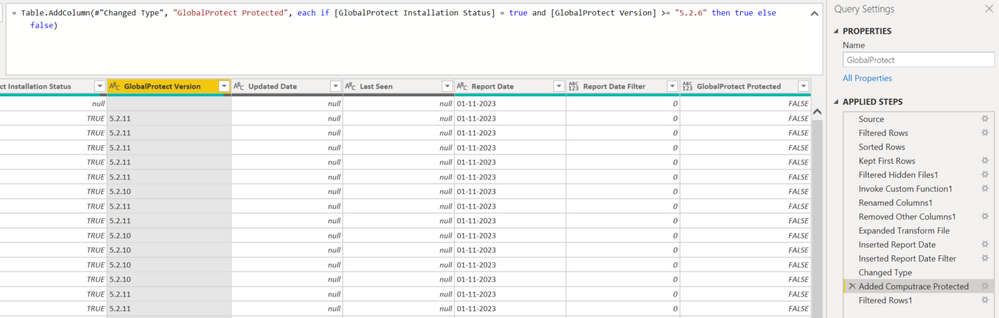
I created a conditional statement for a custom column. I have two sets of columns I'm using to determine the custom column's value.


IF (Installation Status = True) & (Version >= 8.2.6) then the custom column called Protected will be True. 


However, for all the records where Version is 8.2.11 and such the column Protected is showing as False. My intuition is telling me this issue has something to do with comparing characters? But I'm not exactly sure how to resolve this.


Any suggestions or advice would be helpful. Thanks in advance for your expertise and time!Capture.PNG

1 ACCEPTED SOLUTION
Manoj_Nair
Solution Supplier
Solution Supplier

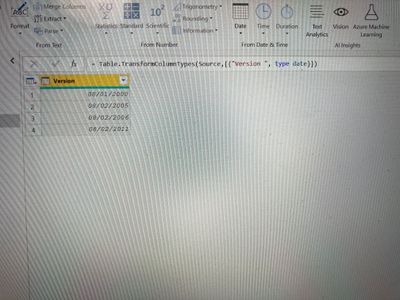
@Anonymous - quick workaround is by changing the data type of version column to Date and you will get a comparable column as shown below and then you use a conditional column.

image.jpg

If this post helps to find solution would be happy if you could mark my post as a solution and give it a thumbs up


Best regards

Manoj Nair

Linkedin - https://www.linkedin.com/in/manoj-nair-%E2%98%81-344666104/

View solution in original post

3 REPLIES 3
Manoj_Nair
Solution Supplier
Solution Supplier

@Anonymous - quick workaround is by changing the data type of version column to Date and you will get a comparable column as shown below and then you use a conditional column.

image.jpg

If this post helps to find solution would be happy if you could mark my post as a solution and give it a thumbs up


Best regards

Manoj Nair

Linkedin - https://www.linkedin.com/in/manoj-nair-%E2%98%81-344666104/

Daryl-Lynch-Bzy
Community Champion
Community Champion

Hi @Anonymous - your intuition is correct.  When Alphanumeric ordering occurs the 6 is greater that 11 because the 6 is compared to the first character.  I would suggest trying to format the number by adding leading zeros.  For example, convert from  "8.2.11"  to "08.02.11".
Try using:

Text.Split - PowerQuery M | Microsoft Learn

List.Transform - PowerQuery M | Microsoft Learn
Text.PadStart - PowerQuery M | Microsoft Learn
Text.Combine - PowerQuery M | Microsoft Learn


let
    Source = Table.FromRows(Json.Document(Binary.Decompress(Binary.FromText("i45WstAz0jNTitWBsAwNwUxDYz0QUoqNBQA=", BinaryEncoding.Base64), Compression.Deflate)), let _t = ((type nullable text) meta [Serialized.Text = true]) in type table [Column1 = _t]),
    #"Added Custom" = Table.AddColumn(Source, "New Column", each 
            Text.Combine(
                List.Transform(
                    Text.Split( [Column1], "." ),
                    each Text.PadStart( _ , 2 , "0" )
                )
            , ".")
            , type text)
in
    #"Added Custom"


Anonymous
Not applicable

You should be using "and" instead of "&" for your conditional statement.


--Nate

Helpful resources

Announcements
FabCon and SQLCon Barcelona 2026

FabCon & SQLCon – Barcelona 2026

Join us in Barcelona for FabCon and SQLCon, the Fabric, Power BI, SQL, and AI community event. Save €200 with code FABCMTY200.

60 days of Data Days Carousel

Data Days 2026

Join Fabric Data Days 2026: 60 days of free live/on-demand sessions, challenges, study groups, and certification opportunities.

Power BI DataViz World Championships carousel

Power BI DataViz World Championships - June 2026

A new Power BI DataViz World Championship is coming this June! Don't miss out on submitting your entry.