cancel
Showing results for 
Search instead for 
Did you mean: 

July 28 - August 9 | Final Round of the Power BI Dataviz World Championships. This is your chance. Learn more

Reply
yogevz
Helper II
Helper II

running diff after sum

hi

i have to tables, upon them i am creating list which aggregate the measure in a list.

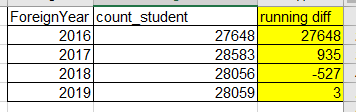
i want to create running diff on rows.

attach picture.

running_diff.PNG

1 ACCEPTED SOLUTION

hi, @yogevz

After my test, you could use this formula to create a measure as below:

Measure = CALCULATE([Count_student measure])- CALCULATE([Count_student measure],FILTER(ALL(Sheet1),Sheet1[Foreign]=MAX(Sheet1[Foreign])-1))

Count_student measure is a measure which count students.


Result:

201811304


Best Regards,

Lin


Community Support Team _ Lin
If this post helps, then please consider Accept it as the solution to help the other members find it more quickly.

View solution in original post

5 REPLIES 5
themistoklis
Community Champion
Community Champion

Use this one instead. In a new column and not measure


DIFF = 
var previous = CALCULATE(FIRSTNONBLANK(Sheet1[count_student], Sheet1[count_student]), FILTER(Sheet1, Sheet1[ForeignYear]=EARLIER(Sheet1[ForeignYear] ) -1))
return IF(ISBLANK(previous),0, Sheet1[count_student]-previous)

IMage below:

image.png


i can't....

the count_student is a measure which count students...

so the column phrase can't see this measure.

this is the problem....

hi, @yogevz

After my test, you could use this formula to create a measure as below:

Measure = CALCULATE([Count_student measure])- CALCULATE([Count_student measure],FILTER(ALL(Sheet1),Sheet1[Foreign]=MAX(Sheet1[Foreign])-1))

Count_student measure is a measure which count students.


Result:

201811304


Best Regards,

Lin


Community Support Team _ Lin
If this post helps, then please consider Accept it as the solution to help the other members find it more quickly.

You can try this formula:

New_Diff = SUM(Sheet1[count_student]) - IF(MAX(Sheet1[ForeignYear])=1, SUM(Sheet1[count_student]), LOOKUPVALUE(Sheet1[count_student], Sheet1[ForeignYear], MAX(Sheet1[ForeignYear])-1))
themistoklis
Community Champion
Community Champion

@yogevz


Please try the following DAX formula:

DIFFERENCE = 
var previous = CALCULATE(FIRSTNONBLANK(Table[count_student];Table[count_student]);FILTER(Table;Table[ForeignYear]=EARLIER(Table[ForeignYear]) )) 
return IF(ISBLANK(previous);0; Table[count_student]-previous)

Helpful resources

Announcements
FabCon and SQLCon Barcelona 2026

FabCon & SQLCon – Barcelona 2026

Join us in Barcelona for FabCon and SQLCon, the Fabric, Power BI, SQL, and AI community event. Save €200 with code FABCMTY200.

Fabric Community Sticker Design Challenge Barcelona Carousel

Fabric Community Sticker Challenge - Barcelona 2026

If you love stickers, then you will definitely want to check out our community sticker challenge, Barcelona edition!

July Power BI Update Carousel

Power BI Monthly Update - July 2026

Check out the July 2026 Power BI update to learn about new features.

Power BI DataViz World Championships carousel

Power BI DataViz World Championships - June 2026

A new Power BI DataViz World Championship is coming this June! Don't miss out on submitting your entry.

Top Solution Authors