Share feedback directly with Fabric product managers, participate in targeted research studies and influence the Fabric roadmap.
Sign up nowGet Fabric certified for FREE! Don't miss your chance! Learn more
hi
i have to tables, upon them i am creating list which aggregate the measure in a list.
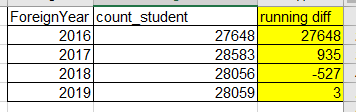
i want to create running diff on rows.
attach picture.
Solved! Go to Solution.
hi, @yogevz
After my test, you could use this formula to create a measure as below:
Measure = CALCULATE([Count_student measure])- CALCULATE([Count_student measure],FILTER(ALL(Sheet1),Sheet1[Foreign]=MAX(Sheet1[Foreign])-1))
Count_student measure is a measure which count students.
Result:
Best Regards,
Lin
Use this one instead. In a new column and not measure
DIFF = var previous = CALCULATE(FIRSTNONBLANK(Sheet1[count_student], Sheet1[count_student]), FILTER(Sheet1, Sheet1[ForeignYear]=EARLIER(Sheet1[ForeignYear] ) -1)) return IF(ISBLANK(previous),0, Sheet1[count_student]-previous)
IMage below:
i can't....
the count_student is a measure which count students...
so the column phrase can't see this measure.
this is the problem....
hi, @yogevz
After my test, you could use this formula to create a measure as below:
Measure = CALCULATE([Count_student measure])- CALCULATE([Count_student measure],FILTER(ALL(Sheet1),Sheet1[Foreign]=MAX(Sheet1[Foreign])-1))
Count_student measure is a measure which count students.
Result:
Best Regards,
Lin
You can try this formula:
New_Diff = SUM(Sheet1[count_student]) - IF(MAX(Sheet1[ForeignYear])=1, SUM(Sheet1[count_student]), LOOKUPVALUE(Sheet1[count_student], Sheet1[ForeignYear], MAX(Sheet1[ForeignYear])-1))
Please try the following DAX formula:
DIFFERENCE = var previous = CALCULATE(FIRSTNONBLANK(Table[count_student];Table[count_student]);FILTER(Table;Table[ForeignYear]=EARLIER(Table[ForeignYear]) )) return IF(ISBLANK(previous);0; Table[count_student]-previous)
Share feedback directly with Fabric product managers, participate in targeted research studies and influence the Fabric roadmap.
| User | Count |
|---|---|
| 63 | |
| 62 | |
| 42 | |
| 19 | |
| 16 |
| User | Count |
|---|---|
| 118 | |
| 106 | |
| 38 | |
| 28 | |
| 27 |