Join us at FabCon Atlanta from March 16 - 20, 2026, for the ultimate Fabric, Power BI, AI and SQL community-led event. Save $200 with code FABCOMM.
Register now!Vote for your favorite vizzies from the Power BI Dataviz World Championship submissions. Vote now!
hi
i have to tables, upon them i am creating list which aggregate the measure in a list.
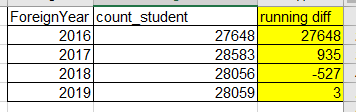
i want to create running diff on rows.
attach picture.
Solved! Go to Solution.
hi, @yogevz
After my test, you could use this formula to create a measure as below:
Measure = CALCULATE([Count_student measure])- CALCULATE([Count_student measure],FILTER(ALL(Sheet1),Sheet1[Foreign]=MAX(Sheet1[Foreign])-1))
Count_student measure is a measure which count students.
Result:
Best Regards,
Lin
Use this one instead. In a new column and not measure
DIFF = var previous = CALCULATE(FIRSTNONBLANK(Sheet1[count_student], Sheet1[count_student]), FILTER(Sheet1, Sheet1[ForeignYear]=EARLIER(Sheet1[ForeignYear] ) -1)) return IF(ISBLANK(previous),0, Sheet1[count_student]-previous)
IMage below:
i can't....
the count_student is a measure which count students...
so the column phrase can't see this measure.
this is the problem....
hi, @yogevz
After my test, you could use this formula to create a measure as below:
Measure = CALCULATE([Count_student measure])- CALCULATE([Count_student measure],FILTER(ALL(Sheet1),Sheet1[Foreign]=MAX(Sheet1[Foreign])-1))
Count_student measure is a measure which count students.
Result:
Best Regards,
Lin
You can try this formula:
New_Diff = SUM(Sheet1[count_student]) - IF(MAX(Sheet1[ForeignYear])=1, SUM(Sheet1[count_student]), LOOKUPVALUE(Sheet1[count_student], Sheet1[ForeignYear], MAX(Sheet1[ForeignYear])-1))
Please try the following DAX formula:
DIFFERENCE = var previous = CALCULATE(FIRSTNONBLANK(Table[count_student];Table[count_student]);FILTER(Table;Table[ForeignYear]=EARLIER(Table[ForeignYear]) )) return IF(ISBLANK(previous);0; Table[count_student]-previous)
Vote for your favorite vizzies from the Power BI World Championship submissions!
If you love stickers, then you will definitely want to check out our Community Sticker Challenge!
Check out the January 2026 Power BI update to learn about new features.
| User | Count |
|---|---|
| 63 | |
| 51 | |
| 41 | |
| 23 | |
| 18 |
| User | Count |
|---|---|
| 130 | |
| 111 | |
| 48 | |
| 30 | |
| 28 |