This is best Fabric, Power BI, SQL and AI community event. How do we know? The last event sold out! Save €200 with code FABCMTY200.
Register nowA new Data Days event is coming soon! This time we’re going bigger than ever. Fabric, Power BI, SQL, AI and more. Don't miss out.
hi
am trying to connect to the API of LiveChat and am using these steps:
- new sources> Other> Web
- url= https://api.livechatinc.com/v2/agents
- use basic option with my username and password (is in fact the API Key)
but i get the message couldn t authenticate with the credentials.
Contacted LiveChat to check whether there are issues with my credentials but if i logon to a website with the same credentials i can see data so for them there is no issue.
What needs to be done to connect to this API??
thanks
M
Solved! Go to Solution.
Hi @Anonymous,
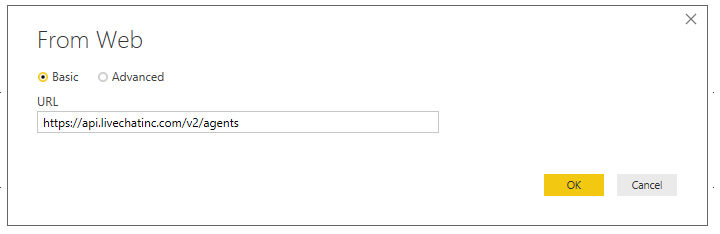
Please follow below steps to get data from agents in Power BI desktop:
1. Get Data > Web, type URL: https://api.livechatinc.com/v2/agents
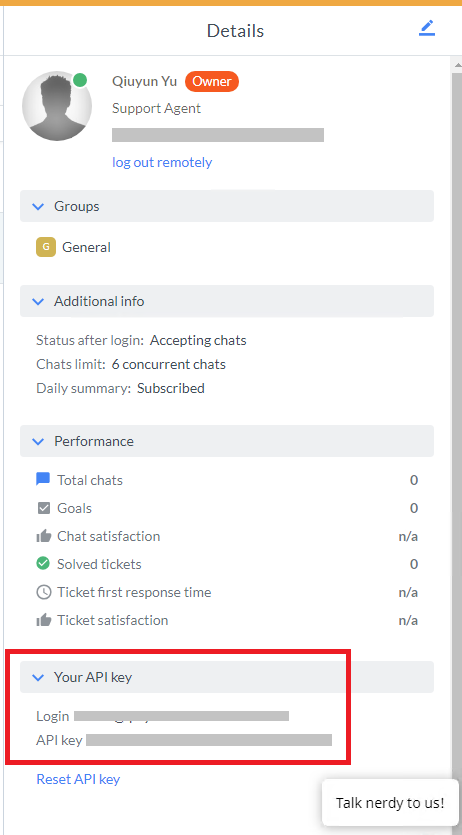
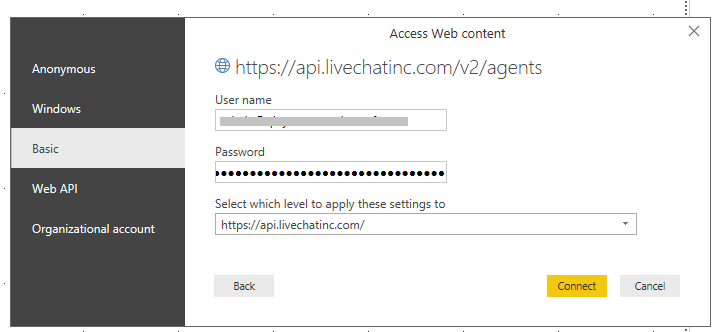
2. Select Basic, type livechat username. Find API key in LiveChat profile and “My API key section”, copy and paste it in Password section.
For more details, please see: https://developers.livechatinc.com/blog/how-to-get-livechat-api-data-with-microsoft-excel-or-power-b...
Best Regards,
Qiuyun Yu
Hi @Anonymous,
Glad to hear my solution works for you. ![]()
Would you please accept my solution as an answer?
Best Regards,
Qiuyun Yu
Hi @Anonymous,
Please follow below steps to get data from agents in Power BI desktop:
1. Get Data > Web, type URL: https://api.livechatinc.com/v2/agents
2. Select Basic, type livechat username. Find API key in LiveChat profile and “My API key section”, copy and paste it in Password section.
For more details, please see: https://developers.livechatinc.com/blog/how-to-get-livechat-api-data-with-microsoft-excel-or-power-b...
Best Regards,
Qiuyun Yu
hi Qiuyun Yu,
lovely, it works!
thanks a lot!!
Hi @Anonymous,
Glad to hear my solution works for you. ![]()
Would you please accept my solution as an answer?
Best Regards,
Qiuyun Yu
Check out the May 2026 Power BI update to learn about new features.
Sign up to receive a private message when registration opens and key events begin.
If you have recently started exploring Fabric, we'd love to hear how it's going. Your feedback can help with product improvements.
| User | Count |
|---|---|
| 31 | |
| 25 | |
| 25 | |
| 22 | |
| 14 |
| User | Count |
|---|---|
| 61 | |
| 49 | |
| 25 | |
| 20 | |
| 20 |