Forum Discussion

Need Help:- Power Query to DAX:- Filtering table of employees for each Role
Hello All,
I am trying to create role based report without using power query but only using dax.
Why i am not interested to use power query is, because with that approach, the master tables rows that i have, those are getting duplicated.
Now cominig to my problem statement,
I have two table
1. EmpMaster
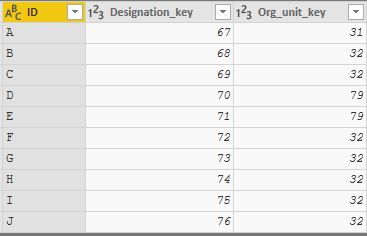
Power Query:-
let
 Source = Table.FromRows(Json.Document(Binary.Decompress(Binary.FromText("Rcq7DcAgFEPRXVxTBEgglPl/Vnhi/zWCUSQ31j2SzbDAIeU20aM6w0rPdOje6CLvLfPAKd0H08snM+h/0VG+6VF+6El+6fS7fg==", BinaryEncoding.Base64), Compression.Deflate)), let _t = ((type text) meta [Serialized.Text = true]) in type table [ID = _t, Designation_key = _t, Org_unit_key = _t]),
 #"Changed Type" = Table.TransformColumnTypes(Source,{{"Designation_key", Int64.Type}, {"Org_unit_key", Int64.Type}})
in
 #"Changed Type"
Now Based on these Org Unit key's, for each org unit there are multiple roles defined.
And these roles are mentained in another master table i.e
2. HR Master Table
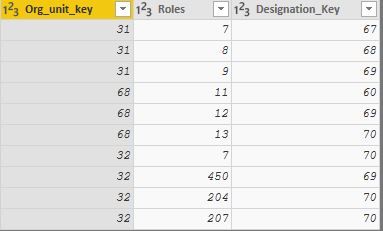
Power Query:-
let
 Source = Table.FromRows(Json.Document(Binary.Decompress(Binary.FromText("i45WMjZU0lEyMDAHkmbmSrE6cBELkIgFsoglSMQSLGIGkjUwBImbGSCLGGGoMQaS5hA1xkZwu5BFTEwNELrAIkYGJmhqjOC6YgE=", BinaryEncoding.Base64), Compression.Deflate)), let _t = ((type text) meta [Serialized.Text = true]) in type table [Org_unit_key = _t, Roles = _t, Designation_Key = _t]),
 #"Changed Type" = Table.TransformColumnTypes(Source,{{"Org_unit_key", Int64.Type}, {"Roles", Int64.Type}, {"Designation_Key", Int64.Type}})
in
 #"Changed Type"
It is quite difficult for me to explain the exact operations that i was doing
So i request you to please go through the power query, and i hope you will understand.
3:- Emps By Role Table(Last Output table)
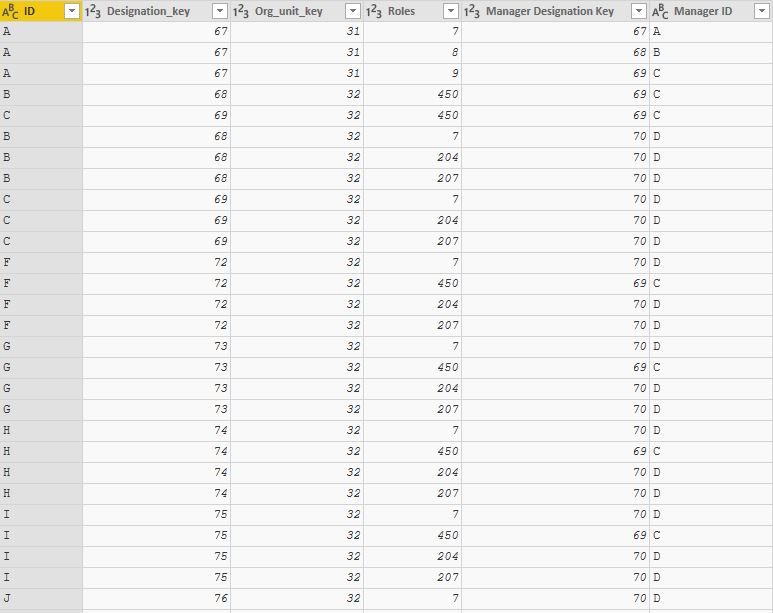
let
 Source = Table.FromRows(Json.Document(Binary.Decompress(Binary.FromText("Rcq7DcAgFEPRXVxTBEgglPl/Vnhi/zWCUSQ31j2SzbDAIeU20aM6w0rPdOje6CLvLfPAKd0H08snM+h/0VG+6VF+6El+6fS7fg==", BinaryEncoding.Base64), Compression.Deflate)), let _t = ((type text) meta [Serialized.Text = true]) in type table [ID = _t, Designation_key = _t, Org_unit_key = _t]),
 #"Changed Type" = Table.TransformColumnTypes(Source,{{"Designation_key", Int64.Type}, {"Org_unit_key", Int64.Type}}),
#"Merged Queries" = Table.NestedJoin(#"Changed Type",{"Org_unit_key"},HR,{"Org_unit_key"},"HR",JoinKind.LeftOuter),
 #"Expanded HR" = Table.ExpandTableColumn(#"Merged Queries", "HR", {"Roles", "Designation_Key"}, {"Roles", "Designation_Key.1"}),
 #"Merged Queries1" = Table.NestedJoin(#"Expanded HR",{"Designation_Key.1"},EmpMaster,{"Designation_key"},"EmpsMaster",JoinKind.LeftOuter),
 #"Expanded EmpsMaster" = Table.ExpandTableColumn(#"Merged Queries1", "EmpsMaster", {"ID"}, {"ID.1"}),
 #"Renamed Columns" = Table.RenameColumns(#"Expanded EmpsMaster",{{"ID.1", "Manager ID"}, {"Designation_Key.1", "Manager Designation Key"}})
in
 #"Renamed Columns"
As of my understaning,
I am trying to bring down all the employees based on each role from HR master table using org unit key, and their designation key.
It is quite easy with power query,as you can see above, but it created a huge table(around 4000000 records) when i tried it with the original data.
Now how i can achive these operations in DAX(measure or calculated column) and without creating duplicate records of each emp or disturbing the master tables.
Please suggest me,
Mohan. V
2 Replies
- AnonymousNot applicable
Hi there,
It is difficult to answer this question without seeing the data, but you can try this, and perhaps show example data if this does not produce the desired results. You would just replace this in the Emps By Role Table
let Source = EmpMaster, #"Merged Queries" = Table.NestedJoin(#"Changed Type",{"Org_unit_key", "Designation_Key"},HR2,{"Org_unit_key","Designation_Key"},"HR2",JoinKind.LeftOuter), #"Expanded HR2" = Table.ExpandTableColumn(#"Merged Queries", "HR2", {"Roles"}, {"Roles"}) in #"Expanded HR2"- AnonymousNot applicable
Dear Anonymous
Thanks for the reply,
I did solved this using power query, and i did mentioned the same in my post as the Last output table which is my end result.
Now my question is, how can i achive this using DAX.