FabCon is coming to Atlanta
Join us at FabCon Atlanta from March 16 - 20, 2026, for the ultimate Fabric, Power BI, AI and SQL community-led event. Save $200 with code FABCOMM.
Register now!- Power BI forums
- Get Help with Power BI
- Desktop
- Service
- Report Server
- Power Query
- Mobile Apps
- Developer
- DAX Commands and Tips
- Custom Visuals Development Discussion
- Health and Life Sciences
- Power BI Spanish forums
- Translated Spanish Desktop
- Training and Consulting
- Instructor Led Training
- Dashboard in a Day for Women, by Women
- Galleries
- Data Stories Gallery
- Themes Gallery
- Contests Gallery
- QuickViz Gallery
- Quick Measures Gallery
- Visual Calculations Gallery
- Notebook Gallery
- Translytical Task Flow Gallery
- TMDL Gallery
- R Script Showcase
- Webinars and Video Gallery
- Ideas
- Custom Visuals Ideas (read-only)
- Issues
- Issues
- Events
- Upcoming Events
The Power BI Data Visualization World Championships is back! Get ahead of the game and start preparing now! Learn more
- Power BI forums
- Forums
- Get Help with Power BI
- Desktop
- Pricing analysis over time - need a change flag/in...
- Subscribe to RSS Feed
- Mark Topic as New
- Mark Topic as Read
- Float this Topic for Current User
- Bookmark
- Subscribe
- Printer Friendly Page


- Mark as New
- Bookmark
- Subscribe
- Mute
- Subscribe to RSS Feed
- Permalink
- Report Inappropriate Content
Pricing analysis over time - need a change flag/indicator
I'm trying to track any/all price changes over a period of time across multiple suppliers. In doing so, I pivoted the data with the Date in the columns, SKU in the rows, and Cost within the values. That works perfectly for my needs, but I also need a flag that indicates if there's a change in price per SKU/row. I tried doing a MAX minus MIN for each line, which worked, but that wouldn't factor Supplier so it would compare all.
Here's a sample of the unpivoted data, with the highlighted portion being what I need to trigger a flag comparing day-over-day changes at both the SKU and Supplier level:
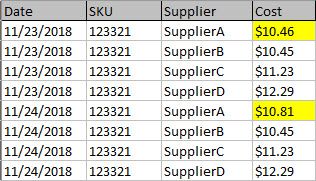
What's the best way of determining a "PriceChangeFlag" by each supplier and sku?
Solved! Go to Solution.
- Mark as New
- Bookmark
- Subscribe
- Mute
- Subscribe to RSS Feed
- Permalink
- Report Inappropriate Content
HI @kahnailee,
You can try to use following measure to return tag based on diff between current and previous cost:
Diff Tag=
VAR currDate =
    MAX ( Table3[Date] )
VAR currSKU =
    SELECTEDVALUE ( Table3[Sku] )
VAR currSupplier =
    SELECTEDVALUE ( Table3[Supplier] )
VAR prevDate =
    CALCULATE (
        MAX ( Table3[Date] ),
        FILTER (
            ALLSELECTED ( Table3 ),
            [Date] < currDate
                && [Supplier] = currSupplier
                && [Sku] = currSKU
        )
    )
VAR prevCost =
    CALCULATE (
        MIN ( Table3[Cost] ),
        FILTER (
            ALLSELECTED ( Table3 ),
            [Date] = prevDate
                && [Supplier] = currSupplier
                && [Sku] = currSKU
        )
    )
VAR result =
    IF ( prevCost <> BLANK (), MAX ( Table3[Cost] ) - prevCost, 0 )
RETURN
    IF ( result > 0, "↑", IF ( result < 0, "↓", "-" ) )
In addition, you can also create a calculated column with dynamic hex color code based on diff, then use conditional formatting feature to add color to original field value.

Conditional formatting in tables
Regards,
Xiaoxin Sheng


- Mark as New
- Bookmark
- Subscribe
- Mute
- Subscribe to RSS Feed
- Permalink
- Report Inappropriate Content
I'm thinking something like:
Measure Flag =
VAR __date = MAX([Data_Date]) //current date
VAR __sku = MAX([SKU]) //current sku
VAR __supplier = MAX([Supplier]) //current supplier
VAR __prevCostDate = MAXX(FILTER(ALL('Table'),[SKU]=__sku && [Supplier]=__supplier && [Data_Date]<__date),[Data_Date])
VAR __prevCost = MAXX(FILTER(ALL('Table'),[SKU]=__sku && [Supplier]=__supplier && [Data_Date]=__prevCostDate),[Cost])
RETURN
IF([Cost]<>__prevCost,1,0)
Follow on LinkedIn
@ me in replies or I'll lose your thread!!!
Instead of a Kudo, please vote for this idea
Become an expert!: Enterprise DNA
External Tools: MSHGQM
YouTube Channel!: Microsoft Hates Greg
Latest book!: DAX For Humans
DAX is easy, CALCULATE makes DAX hard...
- Mark as New
- Bookmark
- Subscribe
- Mute
- Subscribe to RSS Feed
- Permalink
- Report Inappropriate Content
That would work if there was one sku, I believe, but I have thousands. Therefore, I get an error of "a single value for column 'Cost' cannot be determined". Any ideas?
- Mark as New
- Bookmark
- Subscribe
- Mute
- Subscribe to RSS Feed
- Permalink
- Report Inappropriate Content
Sorry, missed an aggregation.
Measure Flag =
VAR __date = MAX([Data_Date]) //current date
VAR __sku = MAX([SKU]) //current sku
VAR __supplier = MAX([Supplier]) //current supplier
VAR __prevCostDate = MAXX(FILTER(ALL('Table'),[SKU]=__sku && [Supplier]=__supplier && [Data_Date]<__date),[Data_Date])
VAR __prevCost = MAXX(FILTER(ALL('Table'),[SKU]=__sku && [Supplier]=__supplier && [Data_Date]=__prevCostDate),[Cost])
RETURN
IF(MAX([Cost])<>__prevCost,1,0)
Follow on LinkedIn
@ me in replies or I'll lose your thread!!!
Instead of a Kudo, please vote for this idea
Become an expert!: Enterprise DNA
External Tools: MSHGQM
YouTube Channel!: Microsoft Hates Greg
Latest book!: DAX For Humans
DAX is easy, CALCULATE makes DAX hard...
- Mark as New
- Bookmark
- Subscribe
- Mute
- Subscribe to RSS Feed
- Permalink
- Report Inappropriate Content
That works, but it doesn't factor each supplier. Meaning, it will look across all suppliers to see if there's a change overall, not looking at one supplier for the available dates. We're getting close though.
- Mark as New
- Bookmark
- Subscribe
- Mute
- Subscribe to RSS Feed
- Permalink
- Report Inappropriate Content
That depends on the context of your visual. If you have a visual setup the way you do in your picture, then it should work. That is why I do a MAX([Supplier]) and then use that in the filters do make sure I am dealing with the correct supplier.
Follow on LinkedIn
@ me in replies or I'll lose your thread!!!
Instead of a Kudo, please vote for this idea
Become an expert!: Enterprise DNA
External Tools: MSHGQM
YouTube Channel!: Microsoft Hates Greg
Latest book!: DAX For Humans
DAX is easy, CALCULATE makes DAX hard...
- Mark as New
- Bookmark
- Subscribe
- Mute
- Subscribe to RSS Feed
- Permalink
- Report Inappropriate Content
This is ideally how I'd like to see the data day over day. I'd also like to have the ability to filter out only those in which have changes (outside of those with zero's or blanks).

I've also put in a filter for Supplier so that should help reduce the anomalies, but I still need the filterable flag.
- Mark as New
- Bookmark
- Subscribe
- Mute
- Subscribe to RSS Feed
- Permalink
- Report Inappropriate Content
HI @kahnailee,
You can try to use following measure to return tag based on diff between current and previous cost:
Diff Tag=
VAR currDate =
    MAX ( Table3[Date] )
VAR currSKU =
    SELECTEDVALUE ( Table3[Sku] )
VAR currSupplier =
    SELECTEDVALUE ( Table3[Supplier] )
VAR prevDate =
    CALCULATE (
        MAX ( Table3[Date] ),
        FILTER (
            ALLSELECTED ( Table3 ),
            [Date] < currDate
                && [Supplier] = currSupplier
                && [Sku] = currSKU
        )
    )
VAR prevCost =
    CALCULATE (
        MIN ( Table3[Cost] ),
        FILTER (
            ALLSELECTED ( Table3 ),
            [Date] = prevDate
                && [Supplier] = currSupplier
                && [Sku] = currSKU
        )
    )
VAR result =
    IF ( prevCost <> BLANK (), MAX ( Table3[Cost] ) - prevCost, 0 )
RETURN
    IF ( result > 0, "↑", IF ( result < 0, "↓", "-" ) )
In addition, you can also create a calculated column with dynamic hex color code based on diff, then use conditional formatting feature to add color to original field value.
Conditional formatting in tables
Regards,
Xiaoxin Sheng
- Mark as New
- Bookmark
- Subscribe
- Mute
- Subscribe to RSS Feed
- Permalink
- Report Inappropriate Content
@Xiaoxin Sheng
Wow, that's an interesting solution. Do you happen to have the file you put together from the screenshot? If so, do you mind sharing?
- Mark as New
- Bookmark
- Subscribe
- Mute
- Subscribe to RSS Feed
- Permalink
- Report Inappropriate Content
HI @kahnailee,
I Just add measure to value field and enable conditional formatting based on calculated column. I attached sample file below.
Regards,
Xiaoxin Sheng


- Mark as New
- Bookmark
- Subscribe
- Mute
- Subscribe to RSS Feed
- Permalink
- Report Inappropriate Content
Hi,
So will you apply a filter on any one supplier and then see the result? If you have 500 suppliers, you will have to filter 500 times. Am i missing something?
Regards,
Ashish Mathur
http://www.ashishmathur.com
https://www.linkedin.com/in/excelenthusiasts/

Helpful resources

Power BI Monthly Update - November 2025
Check out the November 2025 Power BI update to learn about new features.

Fabric Data Days
Advance your Data & AI career with 50 days of live learning, contests, hands-on challenges, study groups & certifications and more!

FabCon Atlanta 2026
Join us at FabCon Atlanta, March 16-20, for the ultimate Fabric, Power BI, AI and SQL community-led event. Save $200 with code FABCOMM.


