cancel
Showing results for 
Search instead for 
Did you mean: 

Data Days is here! Join us now for 60+ days of learning, challenges, and connection. Learn more

Reply
Audi_B
Frequent Visitor

Using Substring to modify column data....Is it possible in Power BI?

Hello all, I have one column in a list showing all accounts with a prefix on all account numbers of "00000". So each of these account numbers show like this: "00000123456789".


I know in typical SQL, I can use a simple:  substring([account_num], 6,9), but is there a way to modify this in Power BI using DAX, or any other solution to this?


Thank you!


-B

2 ACCEPTED SOLUTIONS
Sean
Community Champion
Community Champion

@Audi_B

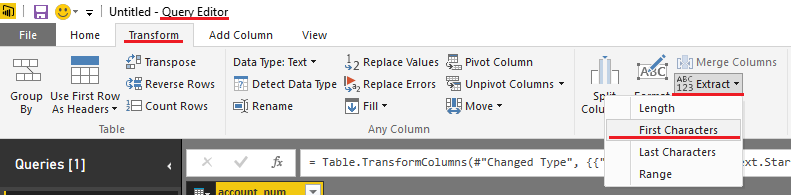
Try this in the Query Editor


Substring.png

Actually you want to select Last Characters

View solution in original post

Greg_Deckler
Community Champion
Community Champion

@Sean's solution will work for M code. 


In DAX, you could create a new column with the following formula:


If all account numbers are the same length:

AcctNum = RIGHT([Account Number],9)

If not:


AcctNum = MID([Account Number,6,LEN([Account Number]) - 5)

You may have to adjust start number and how many characters you are removing from what LEN returns, but general gist is there.


Follow on LinkedIn
@ me in replies or I'll lose your thread!!!
Instead of a Kudo, please vote for this idea
Become an expert!: Enterprise DNA
External Tools: MSHGQM
YouTube Channel!: Microsoft Hates Greg
Latest book!:
DAX For Humans

DAX is easy, CALCULATE makes DAX hard...

View solution in original post

4 REPLIES 4
Greg_Deckler
Community Champion
Community Champion

@Sean's solution will work for M code. 


In DAX, you could create a new column with the following formula:


If all account numbers are the same length:

AcctNum = RIGHT([Account Number],9)

If not:


AcctNum = MID([Account Number,6,LEN([Account Number]) - 5)

You may have to adjust start number and how many characters you are removing from what LEN returns, but general gist is there.


Follow on LinkedIn
@ me in replies or I'll lose your thread!!!
Instead of a Kudo, please vote for this idea
Become an expert!: Enterprise DNA
External Tools: MSHGQM
YouTube Channel!: Microsoft Hates Greg
Latest book!:
DAX For Humans

DAX is easy, CALCULATE makes DAX hard...

Thank you both for the solution. I ended up creating new column and it's working as needed.


Thanks again for quick reply!


-B

Sean
Community Champion
Community Champion

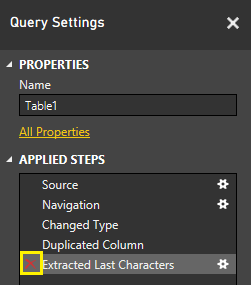
If you want to keep the original column - you can hit Duplicate Column first and then Rename and Transform the duplicate so you have access to both columns for reports.


EDIT: You never actually permanently Transform your original data even if you don't duplicate the Column.

You can go in the Query Settings => Applied Steps and just delete that step!

Substring2.png

Sean
Community Champion
Community Champion

@Audi_B

Try this in the Query Editor


Substring.png

Actually you want to select Last Characters

Helpful resources

Announcements
Fabric Data Days is here Carousel

Fabric Data Days 2026

Don't miss out on Data Days, June 15 through August 7. Learn Fabric, Power BI, SQL, AI and more.

May Power BI Update Carousel

Power BI Monthly Update - May 2026

Check out the May 2026 Power BI update to learn about new features.

Power BI DataViz World Championships carousel

Power BI DataViz World Championships - June 2026

A new Power BI DataViz World Championship is coming this June! Don't miss out on submitting your entry.