Join us at FabCon Atlanta from March 16 - 20, 2026, for the ultimate Fabric, Power BI, AI and SQL community-led event. Save $200 with code FABCOMM.
Register now!The Power BI Data Visualization World Championships is back! Get ahead of the game and start preparing now! Learn more
Hello all, I have one column in a list showing all accounts with a prefix on all account numbers of "00000". So each of these account numbers show like this: "00000123456789".
I know in typical SQL, I can use a simple: substring([account_num], 6,9), but is there a way to modify this in Power BI using DAX, or any other solution to this?
Thank you!
-B
Solved! Go to Solution.
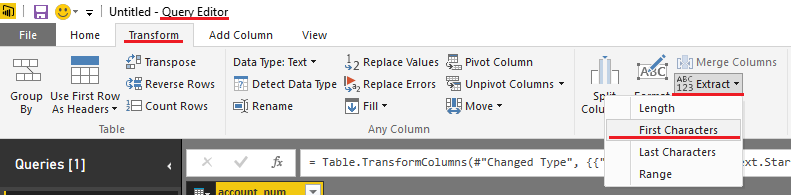
Try this in the Query Editor
Actually you want to select Last Characters
@Sean's solution will work for M code.
In DAX, you could create a new column with the following formula:
If all account numbers are the same length:
AcctNum = RIGHT([Account Number],9)
If not:
AcctNum = MID([Account Number,6,LEN([Account Number]) - 5)
You may have to adjust start number and how many characters you are removing from what LEN returns, but general gist is there.
@Sean's solution will work for M code.
In DAX, you could create a new column with the following formula:
If all account numbers are the same length:
AcctNum = RIGHT([Account Number],9)
If not:
AcctNum = MID([Account Number,6,LEN([Account Number]) - 5)
You may have to adjust start number and how many characters you are removing from what LEN returns, but general gist is there.
Thank you both for the solution. I ended up creating new column and it's working as needed.
Thanks again for quick reply!
-B
If you want to keep the original column - you can hit Duplicate Column first and then Rename and Transform the duplicate so you have access to both columns for reports.
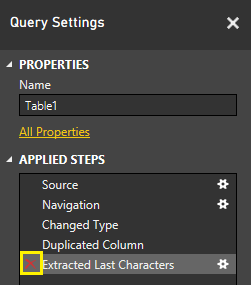
EDIT: You never actually permanently Transform your original data even if you don't duplicate the Column.
You can go in the Query Settings => Applied Steps and just delete that step!
The Power BI Data Visualization World Championships is back! Get ahead of the game and start preparing now!
| User | Count |
|---|---|
| 61 | |
| 43 | |
| 40 | |
| 38 | |
| 22 |
| User | Count |
|---|---|
| 178 | |
| 125 | |
| 116 | |
| 77 | |
| 54 |