Don't miss your chance to take the Fabric Data Engineer (DP-600) exam for FREE! Find out how by attending the DP-600 session on April 23rd (pacific time), live or on-demand.
Learn moreJoin the FabCon + SQLCon recap series. Up next: Power BI, Real-Time Intelligence, IQ and AI, and Data Factory take center stage. All sessions are available on-demand after the live show. Register now
Hello all, I have one column in a list showing all accounts with a prefix on all account numbers of "00000". So each of these account numbers show like this: "00000123456789".
I know in typical SQL, I can use a simple: substring([account_num], 6,9), but is there a way to modify this in Power BI using DAX, or any other solution to this?
Thank you!
-B
Solved! Go to Solution.
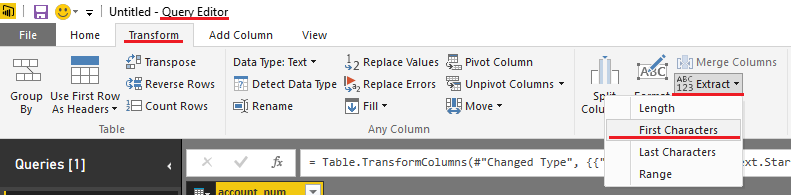
Try this in the Query Editor
Actually you want to select Last Characters
@Sean's solution will work for M code.
In DAX, you could create a new column with the following formula:
If all account numbers are the same length:
AcctNum = RIGHT([Account Number],9)
If not:
AcctNum = MID([Account Number,6,LEN([Account Number]) - 5)
You may have to adjust start number and how many characters you are removing from what LEN returns, but general gist is there.
@Sean's solution will work for M code.
In DAX, you could create a new column with the following formula:
If all account numbers are the same length:
AcctNum = RIGHT([Account Number],9)
If not:
AcctNum = MID([Account Number,6,LEN([Account Number]) - 5)
You may have to adjust start number and how many characters you are removing from what LEN returns, but general gist is there.
Thank you both for the solution. I ended up creating new column and it's working as needed.
Thanks again for quick reply!
-B
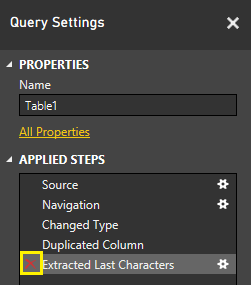
If you want to keep the original column - you can hit Duplicate Column first and then Rename and Transform the duplicate so you have access to both columns for reports.
EDIT: You never actually permanently Transform your original data even if you don't duplicate the Column.
You can go in the Query Settings => Applied Steps and just delete that step!
Check out the April 2026 Power BI update to learn about new features.
If you have recently started exploring Fabric, we'd love to hear how it's going. Your feedback can help with product improvements.
A new Power BI DataViz World Championship is coming this June! Don't miss out on submitting your entry.
| User | Count |
|---|---|
| 48 | |
| 40 | |
| 38 | |
| 20 | |
| 17 |
| User | Count |
|---|---|
| 68 | |
| 66 | |
| 30 | |
| 26 | |
| 25 |