Join us at FabCon Atlanta from March 16 - 20, 2026, for the ultimate Fabric, Power BI, AI and SQL community-led event. Save $200 with code FABCOMM.
Register now!Learn from the best! Meet the four finalists headed to the FINALS of the Power BI Dataviz World Championships! Register now
Hello Community,
I am trying to create a calculated column to deliver a rank. I have a table of data the looks something like this...
| Test ID | Run ID |
1 | 5 |
| 1 | 8 |
| 1 | 3 |
| 2 | 6 |
| 2 | 3 |
| 2 | 1 |
| 3 | 1 |
| 3 | 5 |
| 3 | 9 |
And Im looking to rank the Run ID from highest value to lowest for each Test ID, the expected table would show...
| Test ID | Run ID | Rank |
1 | 5 | 2 |
| 1 | 8 | 3 |
| 1 | 3 | 1 |
| 2 | 6 | 3 |
| 2 | 3 | 2 |
| 2 | 1 | 1 |
| 3 | 1 | 1 |
| 3 | 5 | 2 |
| 3 | 9 | 3 |
Any help from the community is much apperciated!!
Solved! Go to Solution.
Hi,
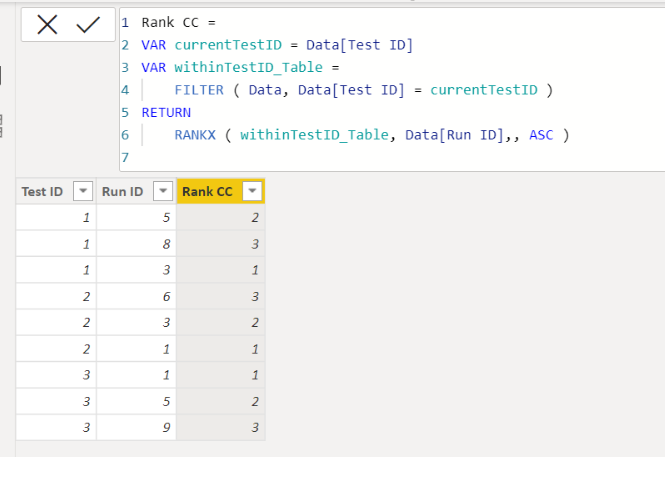
Please check the below picture and the attached pbix file.
It is for creating a new column.
Rank CC =
VAR currentTestID = Data[Test ID]
VAR withinTestID_Table =
FILTER ( Data, Data[Test ID] = currentTestID )
RETURN
RANKX ( withinTestID_Table, Data[Run ID],, ASC )
Thanks for the help! Both solutions work as expected.
Hi,
Please check the below picture and the attached pbix file.
It is for creating a new column.
Rank CC =
VAR currentTestID = Data[Test ID]
VAR withinTestID_Table =
FILTER ( Data, Data[Test ID] = currentTestID )
RETURN
RANKX ( withinTestID_Table, Data[Run ID],, ASC )
Share feedback directly with Fabric product managers, participate in targeted research studies and influence the Fabric roadmap.
Check out the February 2026 Power BI update to learn about new features.
| User | Count |
|---|---|
| 63 | |
| 55 | |
| 41 | |
| 16 | |
| 14 |
| User | Count |
|---|---|
| 98 | |
| 80 | |
| 35 | |
| 29 | |
| 25 |