Get certified for free when you join Fabric Data Days 2026 and dive into Fabric, Power BI, SQL, AI, and other essential data skills.
Join nowData Days is here! Join us now for 60+ days of learning, challenges, and connection. Learn more
Hello Community,
I am trying to create a calculated column to deliver a rank. I have a table of data the looks something like this...
| Test ID | Run ID |
1 | 5 |
| 1 | 8 |
| 1 | 3 |
| 2 | 6 |
| 2 | 3 |
| 2 | 1 |
| 3 | 1 |
| 3 | 5 |
| 3 | 9 |
And Im looking to rank the Run ID from highest value to lowest for each Test ID, the expected table would show...
| Test ID | Run ID | Rank |
1 | 5 | 2 |
| 1 | 8 | 3 |
| 1 | 3 | 1 |
| 2 | 6 | 3 |
| 2 | 3 | 2 |
| 2 | 1 | 1 |
| 3 | 1 | 1 |
| 3 | 5 | 2 |
| 3 | 9 | 3 |
Any help from the community is much apperciated!!
Solved! Go to Solution.
Hi,
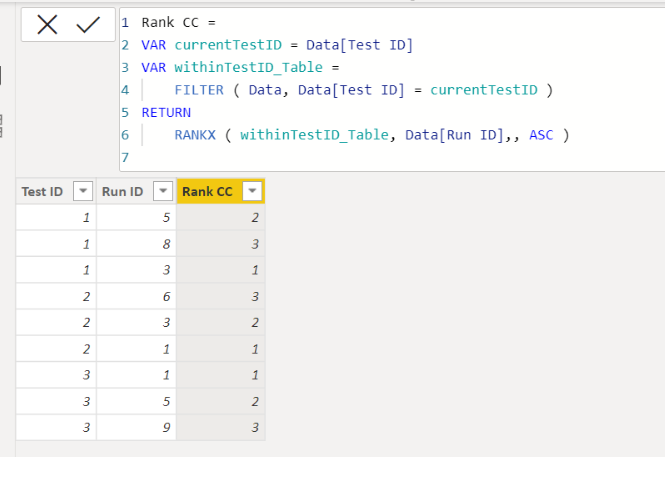
Please check the below picture and the attached pbix file.
It is for creating a new column.
Rank CC =
VAR currentTestID = Data[Test ID]
VAR withinTestID_Table =
FILTER ( Data, Data[Test ID] = currentTestID )
RETURN
RANKX ( withinTestID_Table, Data[Run ID],, ASC )
Thanks for the help! Both solutions work as expected.
Hi,
Please check the below picture and the attached pbix file.
It is for creating a new column.
Rank CC =
VAR currentTestID = Data[Test ID]
VAR withinTestID_Table =
FILTER ( Data, Data[Test ID] = currentTestID )
RETURN
RANKX ( withinTestID_Table, Data[Run ID],, ASC )
Don't miss out on Data Days, June 15 through August 7. Learn Fabric, Power BI, SQL, AI and more.
Check out the May 2026 Power BI update to learn about new features.
| User | Count |
|---|---|
| 23 | |
| 23 | |
| 20 | |
| 18 | |
| 14 |
| User | Count |
|---|---|
| 58 | |
| 51 | |
| 40 | |
| 30 | |
| 24 |