cancel
Showing results for 
Search instead for 
Did you mean: 

The Power BI Data Visualization World Championships is back! It's time to submit your entry. Live now!

Reply
wayersGM
Frequent Visitor

Using RANKX with multiple columns to evaluate

Hello Community, 


I am trying to create a calculated column to deliver a rank. I have a table of data the looks something like this...


Test IDRun ID

1

5
18
13
26
23
21
31
35
39


And Im looking to rank the Run ID from highest value to lowest for each Test ID, the expected table would show...


Test IDRun IDRank

1

52
183
131
263
232
211
311
352
393


Any help from the community is much apperciated!!

2 ACCEPTED SOLUTIONS
amitchandak
Super User
Super User

@wayersGM , Try new Rank

Rank = rankx(filter(Table, [Test ID] = earlier([Test ID]) ), [Run ID] )

Share with Power BI Enthusiasts: Full Power BI Video (20 Hours) YouTube
Microsoft Fabric Series 60+ Videos YouTube
Microsoft Fabric Hindi End to End YouTube

View solution in original post

Jihwan_Kim
Super User
Super User

Hi,

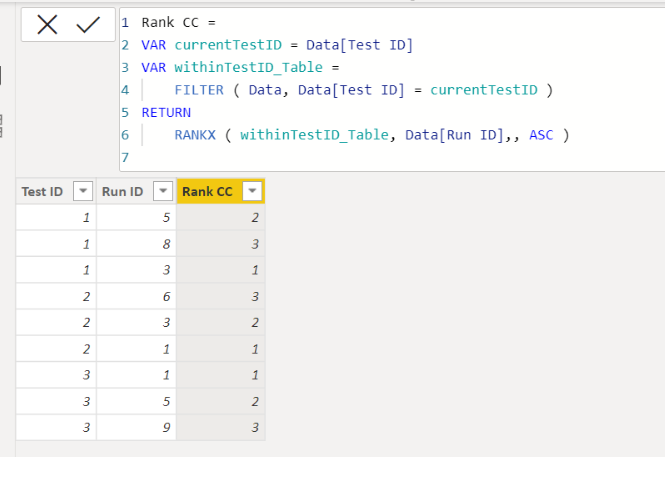
Please check the below picture and the attached pbix file.

It is for creating a new column.


Untitled.png


Rank CC =
VAR currentTestID = Data[Test ID]
VAR withinTestID_Table =
    FILTER ( Data, Data[Test ID] = currentTestID )
RETURN
    RANKX ( withinTestID_Table, Data[Run ID],, ASC )

If this post helps, then please consider accepting it as the solution to help other members find it faster, and give a big thumbs up.


Click here to visit my LinkedIn page

View solution in original post

3 REPLIES 3
wayersGM
Frequent Visitor

@Jihwan_Kim , @amitchandak ,

Thanks for the help! Both solutions work as expected.

Jihwan_Kim
Super User
Super User

Hi,

Please check the below picture and the attached pbix file.

It is for creating a new column.


Untitled.png


Rank CC =
VAR currentTestID = Data[Test ID]
VAR withinTestID_Table =
    FILTER ( Data, Data[Test ID] = currentTestID )
RETURN
    RANKX ( withinTestID_Table, Data[Run ID],, ASC )

If this post helps, then please consider accepting it as the solution to help other members find it faster, and give a big thumbs up.


Click here to visit my LinkedIn page

amitchandak
Super User
Super User

@wayersGM , Try new Rank

Rank = rankx(filter(Table, [Test ID] = earlier([Test ID]) ), [Run ID] )

Share with Power BI Enthusiasts: Full Power BI Video (20 Hours) YouTube
Microsoft Fabric Series 60+ Videos YouTube
Microsoft Fabric Hindi End to End YouTube

Helpful resources

Announcements
FabCon Atlanta 2026 carousel

FabCon Atlanta 2026

Join us at FabCon Atlanta, March 16-20, for the ultimate Fabric, Power BI, AI and SQL community-led event. Save $200 with code FABCOMM.