Join us at FabCon Atlanta from March 16 - 20, 2026, for the ultimate Fabric, Power BI, AI and SQL community-led event. Save $200 with code FABCOMM.
Register now!Vote for your favorite vizzies from the Power BI Dataviz World Championship submissions. Vote now!
Hello Community,
I am trying to create a calculated column to deliver a rank. I have a table of data the looks something like this...
| Test ID | Run ID |
1 | 5 |
| 1 | 8 |
| 1 | 3 |
| 2 | 6 |
| 2 | 3 |
| 2 | 1 |
| 3 | 1 |
| 3 | 5 |
| 3 | 9 |
And Im looking to rank the Run ID from highest value to lowest for each Test ID, the expected table would show...
| Test ID | Run ID | Rank |
1 | 5 | 2 |
| 1 | 8 | 3 |
| 1 | 3 | 1 |
| 2 | 6 | 3 |
| 2 | 3 | 2 |
| 2 | 1 | 1 |
| 3 | 1 | 1 |
| 3 | 5 | 2 |
| 3 | 9 | 3 |
Any help from the community is much apperciated!!
Solved! Go to Solution.
Hi,
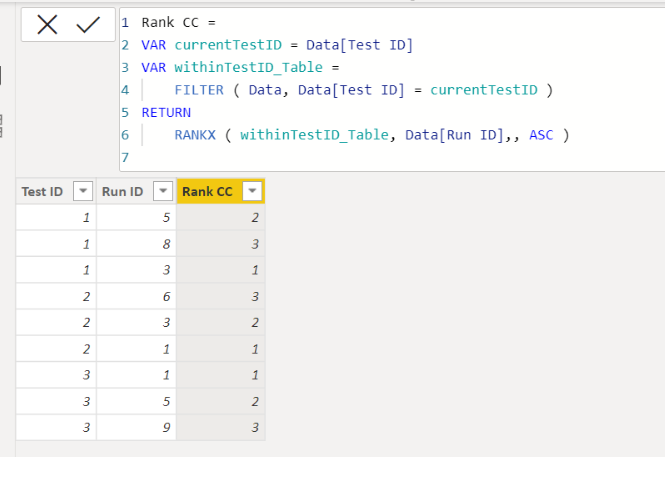
Please check the below picture and the attached pbix file.
It is for creating a new column.
Rank CC =
VAR currentTestID = Data[Test ID]
VAR withinTestID_Table =
FILTER ( Data, Data[Test ID] = currentTestID )
RETURN
RANKX ( withinTestID_Table, Data[Run ID],, ASC )
Thanks for the help! Both solutions work as expected.
Hi,
Please check the below picture and the attached pbix file.
It is for creating a new column.
Rank CC =
VAR currentTestID = Data[Test ID]
VAR withinTestID_Table =
FILTER ( Data, Data[Test ID] = currentTestID )
RETURN
RANKX ( withinTestID_Table, Data[Run ID],, ASC )
Vote for your favorite vizzies from the Power BI World Championship submissions!
If you love stickers, then you will definitely want to check out our Community Sticker Challenge!
Check out the January 2026 Power BI update to learn about new features.
| User | Count |
|---|---|
| 58 | |
| 53 | |
| 43 | |
| 17 | |
| 16 |
| User | Count |
|---|---|
| 123 | |
| 107 | |
| 44 | |
| 32 | |
| 24 |