This is best Fabric, Power BI, SQL and AI community event. How do we know? The last event sold out! Save €200 with code FABCMTY200.
Register nowThe Fabric community is upgrading! Read all of the details including the timeline and what you can expect. Learn more
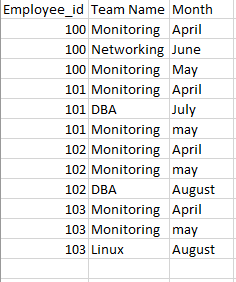
In this, i want the change in team in repsective month
in which month he has changed team and want the count how many has changed,.
Solved! Go to Solution.
Hi @kalpanaV,
Please modify the calculated column 'list' to below:
List = CALCULATE(CONCATENATEX(VALUES(Sheet7[Team Name]),[Team Name],","),FILTER(ALL(Sheet7),Sheet7[Employee_id]=EARLIER(Sheet7[Employee_id])))
Regards,
Xiaoxin Sheng
Hi @kalpanaV,
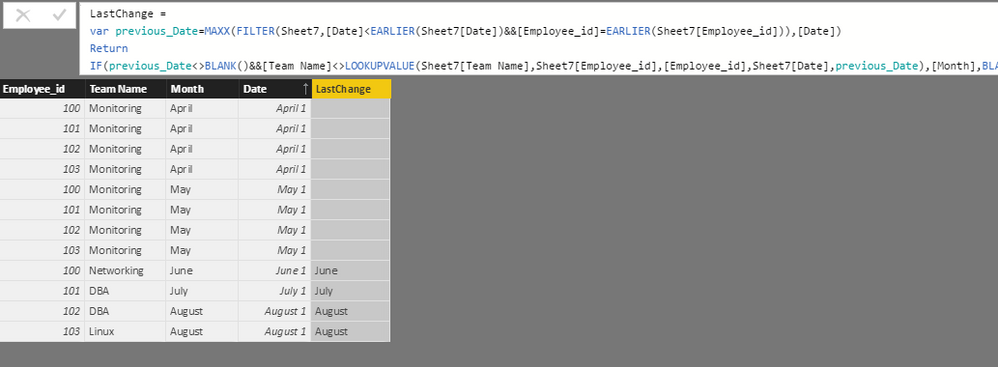
You can try to use below formula if it suitable for your requirement.
1. Add date column as index to table.
Date = DATEVALUE([Month]&" "&1)
2. Add calculated column to calculate the last changed month.
LastChange = var previous_Date=MAXX(FILTER(Sheet7,[Date]<EARLIER(Sheet7[Date])&&[Employee_id]=EARLIER(Sheet7[Employee_id])),[Date]) Return IF(previous_Date<>BLANK()&&[Team Name]<>LOOKUPVALUE(Sheet7[Team Name],Sheet7[Employee_id],[Employee_id],Sheet7[Date],previous_Date),[Month],BLANK())
3. Write measurs to calculate the change count.
Change Count = CALCULATE(COUNT(Sheet7[LastChange]),Sheet7[LastChange]<>BLANK())
Regards,
Xiaoxin Sheng
I tried it, it s giving wrong values.
Else, can we get like this
100 -Monitoring, Networking, Montioring
101- Montioring.DBA, Monitoring
Just i want to list it i table. is this possible/.?
Hi @kalpanaV,
>>I tried it, it s giving wrong values.
Can you provide the detailed error message?
>>Just i want to list it i table. is this possible/.?
Yes, it is possible. You can create a calculate column with below formula:
List = CONCATENATEX(FILTER(ALL(Sheet7),Sheet7[Employee_id]=EARLIER(Sheet7[Employee_id])),[Team Name],",")
Regards,
Xiaoxin Sheng
small change, it should not come like this - Monitoring, monitoring,Networking.
it will be good, if it comes like this - Monitoring,networking.
Hi @kalpanaV,
Please modify the calculated column 'list' to below:
List = CALCULATE(CONCATENATEX(VALUES(Sheet7[Team Name]),[Team Name],","),FILTER(ALL(Sheet7),Sheet7[Employee_id]=EARLIER(Sheet7[Employee_id])))
Regards,
Xiaoxin Sheng
Join us in Barcelona for FabCon and SQLCon, the Fabric, Power BI, SQL, and AI community event. Save €200 with code FABCMTY200.
| User | Count |
|---|---|
| 24 | |
| 22 | |
| 20 | |
| 18 | |
| 14 |
| User | Count |
|---|---|
| 31 | |
| 26 | |
| 23 | |
| 20 | |
| 20 |