Don't miss your chance to take the Fabric Data Engineer (DP-600) exam for FREE! Find out how by attending the DP-600 session on April 23rd (pacific time), live or on-demand.
Learn moreNext up in the FabCon + SQLCon recap series: The roadmap for Microsoft SQL and Maximizing Developer experiences in Fabric. All sessions are available on-demand after the live show. Register now
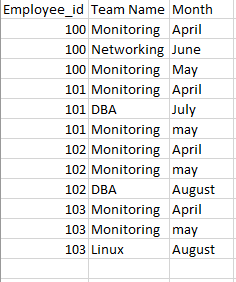
In this, i want the change in team in repsective month
in which month he has changed team and want the count how many has changed,.
Solved! Go to Solution.
Hi @kalpanaV,
Please modify the calculated column 'list' to below:
List = CALCULATE(CONCATENATEX(VALUES(Sheet7[Team Name]),[Team Name],","),FILTER(ALL(Sheet7),Sheet7[Employee_id]=EARLIER(Sheet7[Employee_id])))
Regards,
Xiaoxin Sheng
Hi @kalpanaV,
You can try to use below formula if it suitable for your requirement.
1. Add date column as index to table.
Date = DATEVALUE([Month]&" "&1)
2. Add calculated column to calculate the last changed month.
LastChange = var previous_Date=MAXX(FILTER(Sheet7,[Date]<EARLIER(Sheet7[Date])&&[Employee_id]=EARLIER(Sheet7[Employee_id])),[Date]) Return IF(previous_Date<>BLANK()&&[Team Name]<>LOOKUPVALUE(Sheet7[Team Name],Sheet7[Employee_id],[Employee_id],Sheet7[Date],previous_Date),[Month],BLANK())
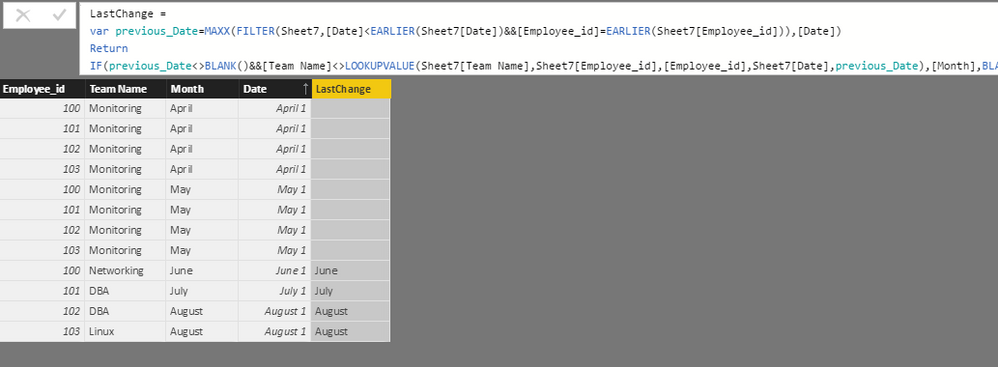
3. Write measurs to calculate the change count.
Change Count = CALCULATE(COUNT(Sheet7[LastChange]),Sheet7[LastChange]<>BLANK())
Regards,
Xiaoxin Sheng
I tried it, it s giving wrong values.
Else, can we get like this
100 -Monitoring, Networking, Montioring
101- Montioring.DBA, Monitoring
Just i want to list it i table. is this possible/.?
Hi @kalpanaV,
>>I tried it, it s giving wrong values.
Can you provide the detailed error message?
>>Just i want to list it i table. is this possible/.?
Yes, it is possible. You can create a calculate column with below formula:
List = CONCATENATEX(FILTER(ALL(Sheet7),Sheet7[Employee_id]=EARLIER(Sheet7[Employee_id])),[Team Name],",")
Regards,
Xiaoxin Sheng
small change, it should not come like this - Monitoring, monitoring,Networking.
it will be good, if it comes like this - Monitoring,networking.
Hi @kalpanaV,
Please modify the calculated column 'list' to below:
List = CALCULATE(CONCATENATEX(VALUES(Sheet7[Team Name]),[Team Name],","),FILTER(ALL(Sheet7),Sheet7[Employee_id]=EARLIER(Sheet7[Employee_id])))
Regards,
Xiaoxin Sheng
If you have recently started exploring Fabric, we'd love to hear how it's going. Your feedback can help with product improvements.
A new Power BI DataViz World Championship is coming this June! Don't miss out on submitting your entry.
Experience the highlights from FabCon & SQLCon, available live and on-demand starting April 14th.
| User | Count |
|---|---|
| 48 | |
| 43 | |
| 40 | |
| 20 | |
| 15 |
| User | Count |
|---|---|
| 70 | |
| 67 | |
| 32 | |
| 27 | |
| 25 |