Learn from the best! Meet the four finalists headed to the FINALS of the Power BI Dataviz World Championships! Register now
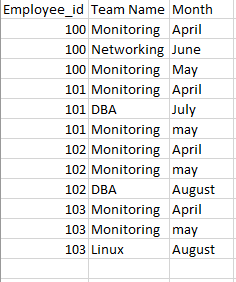
In this, i want the change in team in repsective month
in which month he has changed team and want the count how many has changed,.
Solved! Go to Solution.
Hi @kalpanaV,
Please modify the calculated column 'list' to below:
List = CALCULATE(CONCATENATEX(VALUES(Sheet7[Team Name]),[Team Name],","),FILTER(ALL(Sheet7),Sheet7[Employee_id]=EARLIER(Sheet7[Employee_id])))
Regards,
Xiaoxin Sheng
Hi @kalpanaV,
You can try to use below formula if it suitable for your requirement.
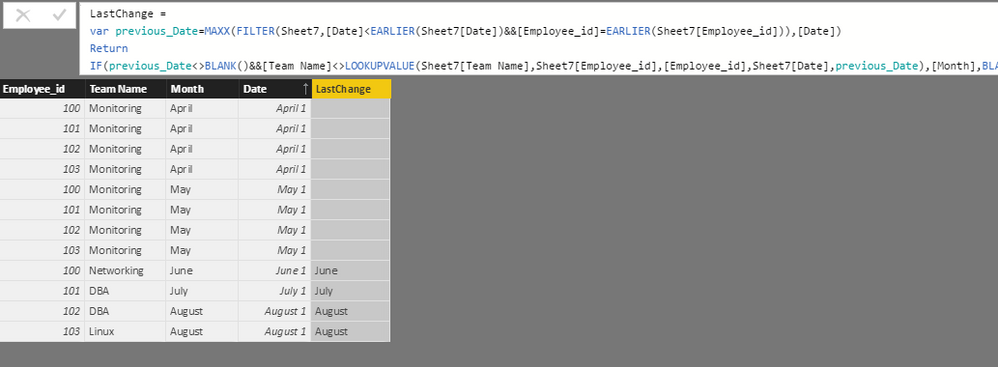
1. Add date column as index to table.
Date = DATEVALUE([Month]&" "&1)
2. Add calculated column to calculate the last changed month.
LastChange = var previous_Date=MAXX(FILTER(Sheet7,[Date]<EARLIER(Sheet7[Date])&&[Employee_id]=EARLIER(Sheet7[Employee_id])),[Date]) Return IF(previous_Date<>BLANK()&&[Team Name]<>LOOKUPVALUE(Sheet7[Team Name],Sheet7[Employee_id],[Employee_id],Sheet7[Date],previous_Date),[Month],BLANK())
3. Write measurs to calculate the change count.
Change Count = CALCULATE(COUNT(Sheet7[LastChange]),Sheet7[LastChange]<>BLANK())
Regards,
Xiaoxin Sheng
I tried it, it s giving wrong values.
Else, can we get like this
100 -Monitoring, Networking, Montioring
101- Montioring.DBA, Monitoring
Just i want to list it i table. is this possible/.?
Hi @kalpanaV,
>>I tried it, it s giving wrong values.
Can you provide the detailed error message?
>>Just i want to list it i table. is this possible/.?
Yes, it is possible. You can create a calculate column with below formula:
List = CONCATENATEX(FILTER(ALL(Sheet7),Sheet7[Employee_id]=EARLIER(Sheet7[Employee_id])),[Team Name],",")
Regards,
Xiaoxin Sheng
small change, it should not come like this - Monitoring, monitoring,Networking.
it will be good, if it comes like this - Monitoring,networking.
Hi @kalpanaV,
Please modify the calculated column 'list' to below:
List = CALCULATE(CONCATENATEX(VALUES(Sheet7[Team Name]),[Team Name],","),FILTER(ALL(Sheet7),Sheet7[Employee_id]=EARLIER(Sheet7[Employee_id])))
Regards,
Xiaoxin Sheng
If you have recently started exploring Fabric, we'd love to hear how it's going. Your feedback can help with product improvements.
A new Power BI DataViz World Championship is coming this June! Don't miss out on submitting your entry.
Share feedback directly with Fabric product managers, participate in targeted research studies and influence the Fabric roadmap.
| User | Count |
|---|---|
| 57 | |
| 33 | |
| 33 | |
| 19 | |
| 18 |
| User | Count |
|---|---|
| 68 | |
| 67 | |
| 45 | |
| 30 | |
| 28 |