This is best Fabric, Power BI, SQL and AI community event. How do we know? The last event sold out! Save €200 with code FABCMTY200.
Register nowA new Data Days event is coming soon! This time we’re going bigger than ever. Fabric, Power BI, SQL, AI and more. Don't miss out.
Hi All,
I'm new to Power BI (and DAX) coming from Tableau.
I've got a question regarding the DiscountCount function.
I need to calculate a percentage of orders that include a certain item. The way my data is structured is line items on every order for the last year. (Example: If one order has three items on it, three lines are returned for that order each line with a specific item).
I'd like to create a measure that give me the sum of a distinct count of order numbers but only if they include a certain item number. I can't use the filter function because I'd need to compare the afore mentioned measure to a count of all distinct orders.
This seems like something that should be very doable, I'm just can't wrap my head around it yet.
Thanks!
PS - Does anyone have any good resources (perferably books) that can get me into the swing of using DAX and Power BI?
Solved! Go to Solution.
CALCULATE(
DISTINCTCOUNT( FactOrder[OrderNumber] )
,FactOrder[Line Item] = <certein item number>
)
CALCULATE(
DISTINCTCOUNT( FactOrder[OrderNumber] )
,FactOrder[Line Item] = <certein item number>
)
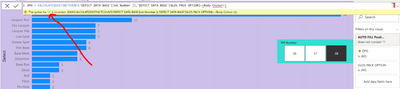
@greggyb @Anonymous I am trying to use your formula, but i am not sure where I am doing a mistake
want to calculate distinct job number on gloss pack option or body colour option
Here is the error
Worked perfectly! Thank you so much!
If you want to understand the reason behind that answer, check this out: http://www.powerpivotpro.com/2009/12/powerpivot-dax-calculate-is-a-supercharged-sumif/
Actually the title of that blog post is slightly misleading; CALCULATE is a supercharged WHATEVERIF. COUNTIF, SUMIF, DIVIDEIF, etc. depending on what kind of expression you feed into it. That whole blog is a fantastic resource for learning DAX, and they've got a great book as well.
Thank for the resource, I really appreciate it!
Check out the May 2026 Power BI update to learn about new features.
Sign up to receive a private message when registration opens and key events begin.
If you have recently started exploring Fabric, we'd love to hear how it's going. Your feedback can help with product improvements.
| User | Count |
|---|---|
| 31 | |
| 26 | |
| 23 | |
| 22 | |
| 13 |
| User | Count |
|---|---|
| 62 | |
| 47 | |
| 28 | |
| 23 | |
| 19 |