Get certified for free when you join Fabric Data Days 2026 and dive into Fabric, Power BI, SQL, AI, and other essential data skills.
Join nowData Days is here! Join us now for 60+ days of learning, challenges, and connection. Learn more
I see lots of posts on converting a unix timestamp integer into a datetime (timestamp). How would one take a DateTime value (2018-08-22 10:11:12) and convert it into a a unix timestamp integer (i.e. number of seconds after Jan 1 1970).
I would like to do it in a calculated column (M), but it would be nice to know how to do it in a measure as well (DAX). Thanks.
Solved! Go to Solution.
Hi @Anonymous
You may try to create a column as below.
Column=Duration.TotalSeconds([Column1]-#datetime(1970, 1, 1, 0, 0, 0))
Regards,
Cherie
Hi @Anonymous
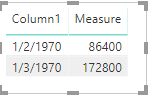
You may try this measure to convert Date Time into Unix Timestamp integer.
Measure = DATEDIFF ( DATE ( 1970, 1, 1 ), MAX ( Table2[Column1] ), SECOND )
Regards,
Cherie
Thank you.
I did some trial and error with a Calculated Column (M code) and think I got this to work correctly.
= Table.AddColumn(#"Changed Type", "TimestampUNIX", each Duration.TotalSeconds([Timestamp] - DateTime.FromText("1970-01-01 00:00:00")))Someone can tell me if they see a problem with this or have a more efficient method.
Hi @Anonymous
You may try to create a column as below.
Column=Duration.TotalSeconds([Column1]-#datetime(1970, 1, 1, 0, 0, 0))
Regards,
Cherie
hmm I get an error when I use this in M query:
Expression.Error: We cannot apply operator - to types Number and DateTime.
Details:
Operator=-
Left=1583959530
Right=1/1/1970 12:00:00
Don't miss out on Data Days, June 15 through August 7. Learn Fabric, Power BI, SQL, AI and more.
Check out the May 2026 Power BI update to learn about new features.
| User | Count |
|---|---|
| 23 | |
| 23 | |
| 20 | |
| 18 | |
| 14 |
| User | Count |
|---|---|
| 58 | |
| 51 | |
| 41 | |
| 30 | |
| 24 |