Don't miss your chance to take the Fabric Data Engineer (DP-600) exam for FREE! Find out how by attending the DP-600 session on April 23rd (pacific time), live or on-demand.
Learn moreNext up in the FabCon + SQLCon recap series: The roadmap for Microsoft SQL and Maximizing Developer experiences in Fabric. All sessions are available on-demand after the live show. Register now
I see lots of posts on converting a unix timestamp integer into a datetime (timestamp). How would one take a DateTime value (2018-08-22 10:11:12) and convert it into a a unix timestamp integer (i.e. number of seconds after Jan 1 1970).
I would like to do it in a calculated column (M), but it would be nice to know how to do it in a measure as well (DAX). Thanks.
Solved! Go to Solution.
Hi @Anonymous
You may try to create a column as below.
Column=Duration.TotalSeconds([Column1]-#datetime(1970, 1, 1, 0, 0, 0))
Regards,
Cherie
Hi @Anonymous
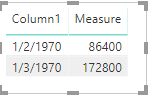
You may try this measure to convert Date Time into Unix Timestamp integer.
Measure = DATEDIFF ( DATE ( 1970, 1, 1 ), MAX ( Table2[Column1] ), SECOND )
Regards,
Cherie
Thank you.
I did some trial and error with a Calculated Column (M code) and think I got this to work correctly.
= Table.AddColumn(#"Changed Type", "TimestampUNIX", each Duration.TotalSeconds([Timestamp] - DateTime.FromText("1970-01-01 00:00:00")))Someone can tell me if they see a problem with this or have a more efficient method.
Hi @Anonymous
You may try to create a column as below.
Column=Duration.TotalSeconds([Column1]-#datetime(1970, 1, 1, 0, 0, 0))
Regards,
Cherie
hmm I get an error when I use this in M query:
Expression.Error: We cannot apply operator - to types Number and DateTime.
Details:
Operator=-
Left=1583959530
Right=1/1/1970 12:00:00
If you have recently started exploring Fabric, we'd love to hear how it's going. Your feedback can help with product improvements.
A new Power BI DataViz World Championship is coming this June! Don't miss out on submitting your entry.
| User | Count |
|---|---|
| 44 | |
| 43 | |
| 38 | |
| 19 | |
| 15 |
| User | Count |
|---|---|
| 68 | |
| 64 | |
| 31 | |
| 29 | |
| 24 |