cancel
Showing results for 
Search instead for 
Did you mean: 

Data Days is here! Join us now for 60+ days of learning, challenges, and connection. Learn more

Reply
Anonymous
Not applicable

scroll bar bug when dragging

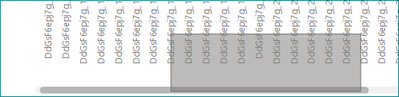
clicking on a horizontal scroll bar of any plot on the web report opens a selection tool that creates a rectangle selection of data, instead of dragging the scroll bar.

4 REPLIES 4
vanessafvg
Community Champion
Community Champion

can you screenshot what you seeing? are you doing this in a dashboard or report? can you give more information please.


If I took the time to answer your question and I came up with a solution, please mark my post as a solution and /or give kudos freely for the effort 🙂 Thank you!

Proud to be a Super User!


Anonymous
Not applicable

sebastiansanch_0-1600165767956.png

in the report, i clicked on the bottom left corner of the rectangle to drag the scroll bar, but the rectangle appears

Anonymous
Not applicable

btw, clicking with the right button works to scroll, although of course when released it shows the context menu.

hi @Anonymous 

Just release the left mouse button, then it should work.


Regards,

Lin

Community Support Team _ Lin
If this post helps, then please consider Accept it as the solution to help the other members find it more quickly.

Helpful resources

Announcements
Fabric Data Days is here Carousel

Fabric Data Days 2026

Don't miss out on Data Days, June 15 through August 7. Learn Fabric, Power BI, SQL, AI and more.

May Power BI Update Carousel

Power BI Monthly Update - May 2026

Check out the May 2026 Power BI update to learn about new features.

Power BI DataViz World Championships carousel

Power BI DataViz World Championships - June 2026

A new Power BI DataViz World Championship is coming this June! Don't miss out on submitting your entry.