This time we’re going bigger than ever. Fabric, Power BI, SQL, AI and more. We're covering it all. You won't want to miss it.
Learn moreLevel up your Power BI skills this month - build one visual each week and tell better stories with data! Get started
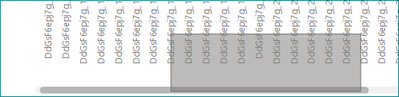
clicking on a horizontal scroll bar of any plot on the web report opens a selection tool that creates a rectangle selection of data, instead of dragging the scroll bar.
Proud to be a Super User!
in the report, i clicked on the bottom left corner of the rectangle to drag the scroll bar, but the rectangle appears
btw, clicking with the right button works to scroll, although of course when released it shows the context menu.
hi @Anonymous
Just release the left mouse button, then it should work.
Regards,
Lin
Check out the April 2026 Power BI update to learn about new features.
Sign up to receive a private message when registration opens and key events begin.
If you have recently started exploring Fabric, we'd love to hear how it's going. Your feedback can help with product improvements.
| User | Count |
|---|---|
| 11 | |
| 9 | |
| 8 | |
| 6 | |
| 6 |
| User | Count |
|---|---|
| 41 | |
| 27 | |
| 25 | |
| 22 | |
| 22 |