Join us at FabCon Atlanta from March 16 - 20, 2026, for the ultimate Fabric, Power BI, AI and SQL community-led event. Save $200 with code FABCOMM.
Register now!The Power BI Data Visualization World Championships is back! It's time to submit your entry. Live now!
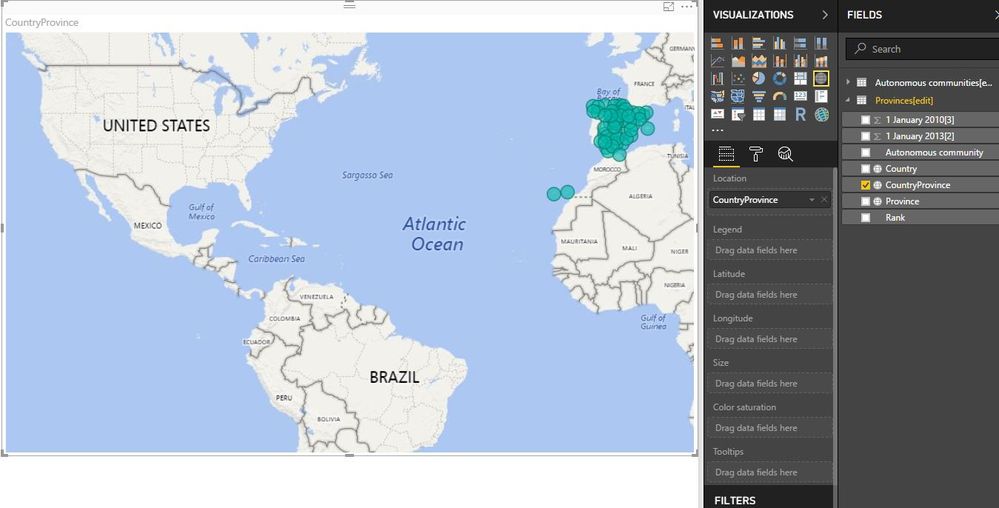
Hello, I have a problem. On having showed a map of Spain with information for provinces, there are provinces that me appear in america. I have put a filter in " visual level filters " with country: Spain and categorized as country, but it is not solved. Can someone help me? Thank you
Solved! Go to Solution.
Hi @lbarreiro,
There are two easy ways to make it right.
1. Add a new Calculated column "Country province". Pay attention to the space following "Spain".
Change its "Data Category" to "Place".
CountryProvince = CONCATENATE ( "Spain ", [Province] )
2. Add a Calculated column "Spain".
Chang its "Data Category" to Country.
Best Regards!
Dale
Hi @lbarreiro,
There are two easy ways to make it right.
1. Add a new Calculated column "Country province". Pay attention to the space following "Spain".
Change its "Data Category" to "Place".
CountryProvince = CONCATENATE ( "Spain ", [Province] )
2. Add a Calculated column "Spain".
Chang its "Data Category" to Country.
Best Regards!
Dale
Thank you! I could made it.
The Power BI Data Visualization World Championships is back! It's time to submit your entry.
Check out the January 2026 Power BI update to learn about new features.
| User | Count |
|---|---|
| 22 | |
| 15 | |
| 10 | |
| 7 | |
| 4 |